Guide · General
What Is Marketing Automation? a Plain Guide for 2026
Find out what is marketing automation in plain terms, with triggers, workflows, real examples and the metrics to track before buying software in 2026.
By the TopToolAdvisor research desk · Updated November 18, 2026 · 11 min read
A founder opens last week's form fills. Half never got a reply. The rest received the same newsletter as everyone else. Sales asks who is ready to talk, and nobody can point to a record with an owner. That is usually when "what is marketing automation" stops sounding like jargon and starts sounding like a missing employee.
The plain version: software and data run recurring tasks, such as sending a reply or routing a lead, once a defined trigger fires. Automated sends often earn more attention than one-off campaigns because they arrive while the reason for the message is still fresh.
The part most definitions skip is the operating work around the tool. Someone cleans duplicates, decides which field means "ready," names an owner for each rule, and checks the log after every run. A signup reply is the easy case. A lead score that hands a prospect to sales only works when the team trusts the record behind it.
Table of Contents
- Marketing Automation Defined in Plain Terms
- Common Workflows Businesses Run Every Day
- How a Trigger Becomes an Automated Workflow
- How Businesses Use Marketing Automation Day to Day
- Benefits and the Results Worth Tracking
- Misconceptions and Limits to Know Before You Start
- Choose a Platform Against Your Workflow Map
Marketing Automation Defined in Plain Terms
Say a clinic collects emails at the front desk and also from a website form. Marketing automation is the use of software and data to automate recurring marketing processes while coordinating segmentation, database management, campaign execution, lead management, analytics, and reporting, which is how an academic review of the field frames it. The aim is less manual sending, and messages that land while the reason for them is still fresh.
A bulk email is one announcement shouted at a whole crowd. Automation is closer to a trained receptionist. That person greets each visitor based on what the visitor just did, then walks the serious ones over to a salesperson.
Three rules cover a first setup:
- Form reply: A personalized email goes out after a form submission.
- Score handoff: A lead is assigned to a salesperson once its score passes a threshold.
- Quiet customers: Inactive customers enter a re-engagement sequence.
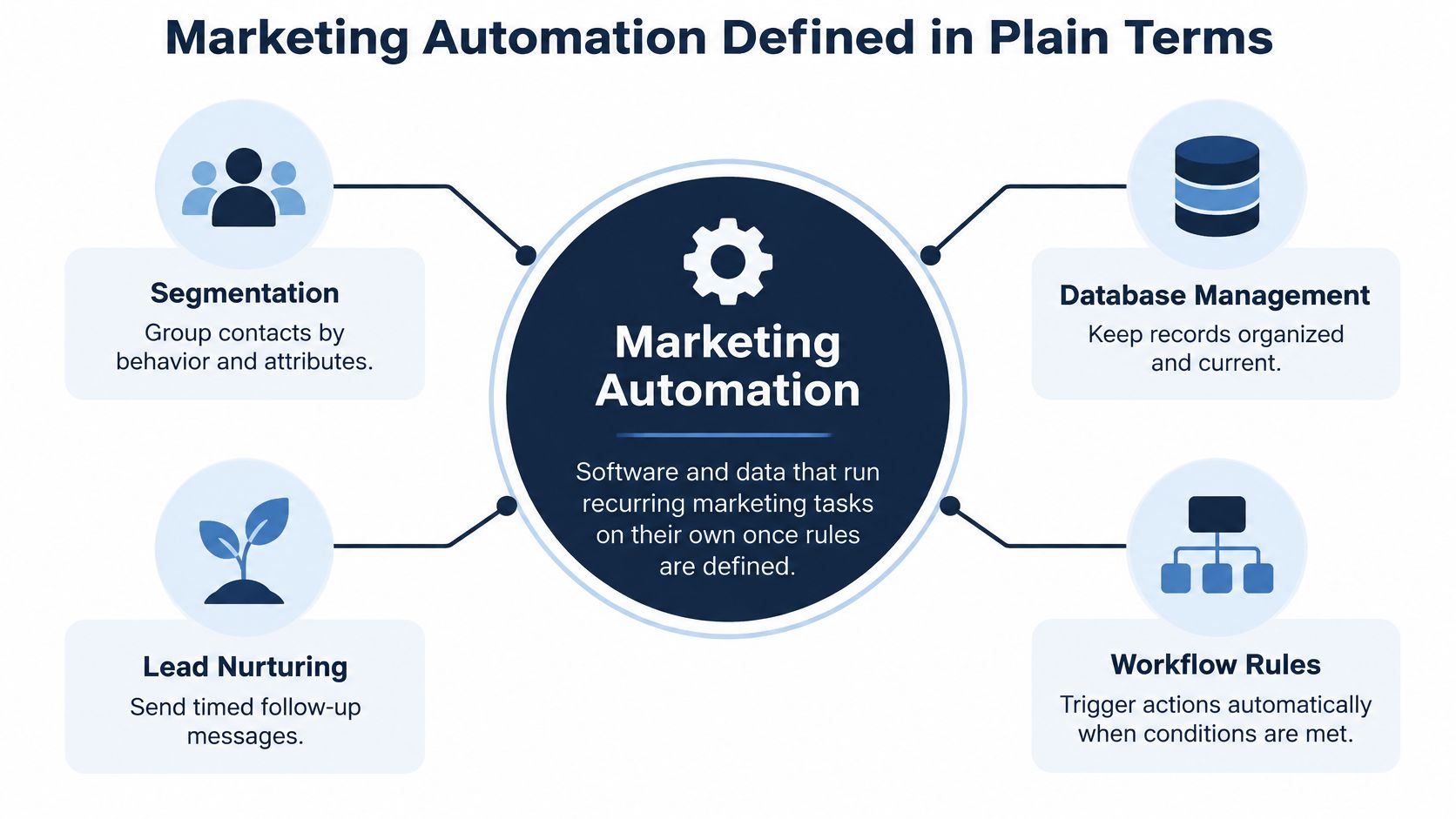
Those rules sit on customer records, behavioral triggers, workflows, personalization, and measurement. Together they are a repeatable operating system, not a larger blast list. The same review treats that mix as the point of the practice, because timing and targeting replace one-off sending.
A message should fire because a person did something, not because the calendar said it was newsletter day.
The everyday versions of those rules, with a trigger and a goal on each, are the practical next step. Building them means naming the event, the action, and the person who checks the result.
Common Workflows Businesses Run Every Day
Most small teams do not need a dozen journeys on day one. They need a short list they can maintain. The table is the reference. Read the trigger column before the action column, because a missing event means the row cannot run.
| Workflow | Trigger | Automated action | Typical goal |
|---|---|---|---|
| Welcome sequence | New subscriber or form submission | Tailored welcome emails over several days | Early engagement |
| Lead scoring and routing | Score passes a set threshold | Lead assigned to a salesperson | Faster follow-up on hot leads |
| Abandoned cart recovery | Shopper leaves items in cart | Reminder email or SMS | Recover lost sales |
| Re-engagement | Customer inactive for a set period | Win-back sequence, suppressed if the contact responds | Keep the list active |
| Post-demo follow-up | Demo booked or completed | Case study email and follow-up task | Move deals forward |
| Renewal reminder | Contract date approaching | Email plus a CRM task for the account owner | Reduce churn |
Where the first builds usually break
Welcome sequence and abandoned cart recovery fail less often, because the event is obvious. A signup or a cart is a single fact the form or the store already records. Lead scoring and routing and renewal reminder fail when the record is wrong. Routing needs a score the team trusts and a CRM record with an owner. A renewal email needs a real contract date. If two people share one email, or the owner field is blank, the software still sends. It just sends to the wrong place, or to nobody who will act.
Re-engagement has a quieter failure. If the sequence does not stop when someone replies or buys, the same person gets a win-back note after they already came back. Suppression is part of the action, not an optional extra.
What to build first
Start with the workflow that has the clearest trigger and the most measurable goal. For many organizations, that is the welcome sequence or the cart reminder. Run that first version cleanly for a few weeks before adding branches. Renewal reminders and routing should wait until contact data has been cleaned.
Practical rule: Pick the workflow that touches the most revenue or the most repeated manual work, and map that one first.
How a Trigger Becomes an Automated Workflow
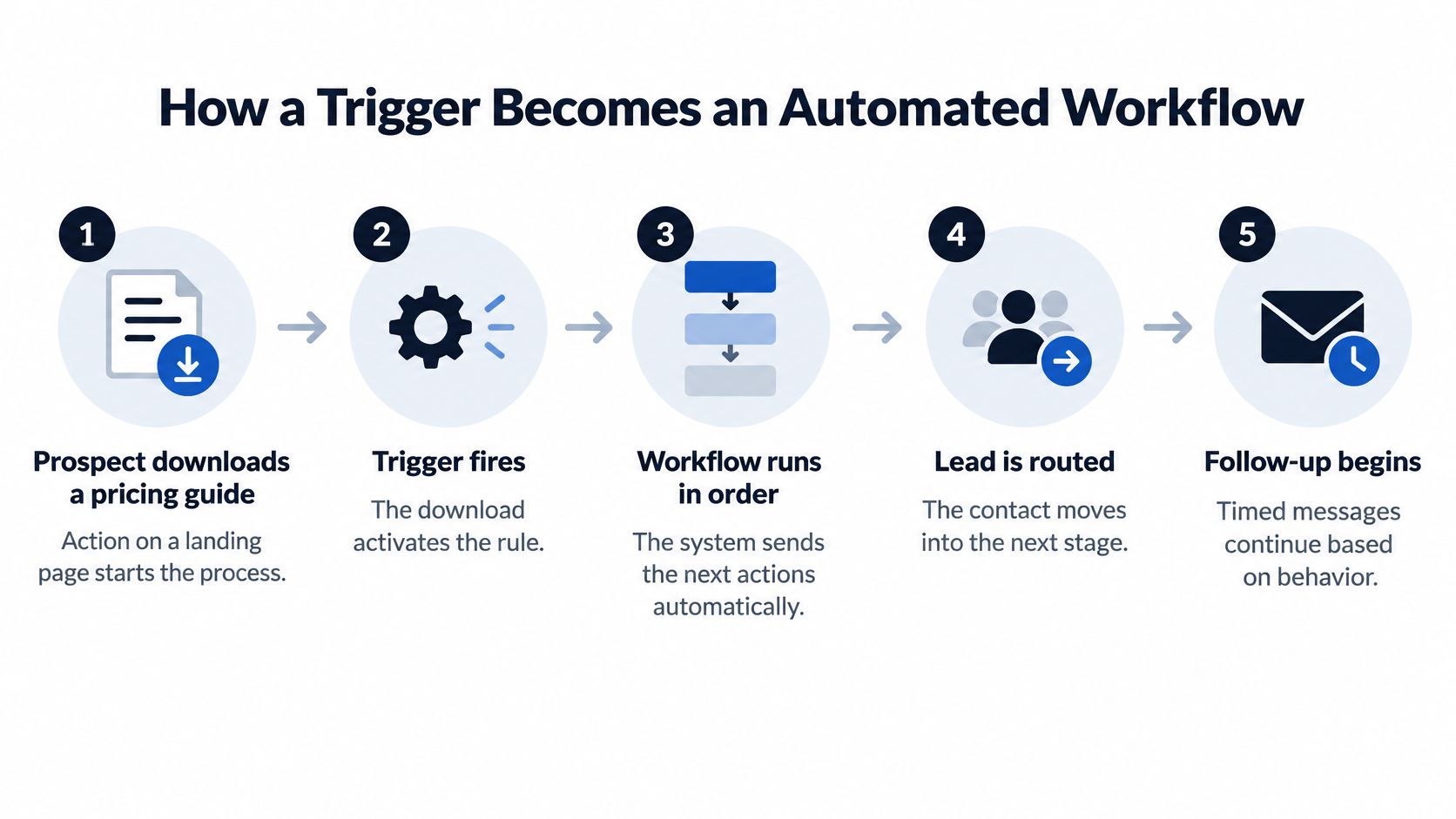
Take one path and keep every later step tied to it. A prospect downloads a pricing guide from a landing page. That download is the only event in this example.
- Detect the trigger. The form submission is the event. The same slot could later hold a page visit, an abandoned cart, or a score threshold, but this run starts with the guide download.
- Select the audience and apply conditions. The workflow keeps contacts who have no purchase on file and drops anyone already in a sales conversation about that guide.
- Deliver the action. The prospect gets one email with the guide and a short next step. A hot score could instead create a task for a salesperson in the CRM, or add the person to an ad audience. This example stays on email.
- Update the contact record. The system writes a tag, a stage, or a score change so the next rule can see that the guide was sent.
- Measure the outcome. Opens, replies, and meetings land in a report. If almost nobody replies, the team changes the email or the wait time, not the whole map.
The layers under those steps
Academic analysis groups the discipline into four capabilities, which an overview of marketing automation systems sets out as smart technology and data automation, personalized content with sales integration, decision support and analytics, and specialized applications. The pricing-guide path uses all four in miniature. The download is captured data. The email is personalized content. The report is decision support. A later CRM task is the sales link.
Before any platform is shortlisted, run one test. Can it capture events, segment contacts, branch on conditions, suppress people who should not get the message, sync with the CRM, and record what happened? Pipeline math belongs in the same conversation, which is why a CRM statistics collection helps a team agree what a qualified lead means before software assigns one.
How Businesses Use Marketing Automation Day to Day
Business type picks the first workflow and the cleanup that has to happen before launch. Three profiles cover the cases founders usually match.
Local service firm
A clinic or a plumbing firm starts with a welcome sequence for new enquiries and a review request after each completed job. The trigger is a booking or a job status the team already records. The channel is email, sometimes SMS for the review ask. Before launch, enquiry records need a real email, a job status, and consent to write. The first number to watch is booked appointments, not opens.
Online store
A shop starts with abandoned cart recovery and a post-purchase note that suggests one complementary product. Cart and order events arrive from the store platform, so the data requirement is a working connection and a product feed that names what was left behind. Email carries the reminder. SMS is a second touch only if the shopper opted in. The first measure is recovered orders, counted inside a set window after the cart event.
B2B team with a pipeline
A sales-led team starts with scoring and routing, post-demo follow-up, and renewal reminders. Each of those needs a CRM record with an owner and a score sales will use. The channel mix is email plus a CRM task. The first measure is meetings held after the demo, then renewals kept, not the size of the newsletter list.
If the records for that profile are messy, fix them before any sequence goes live. Platform price only makes sense after that map exists.
Benefits and the Results Worth Tracking
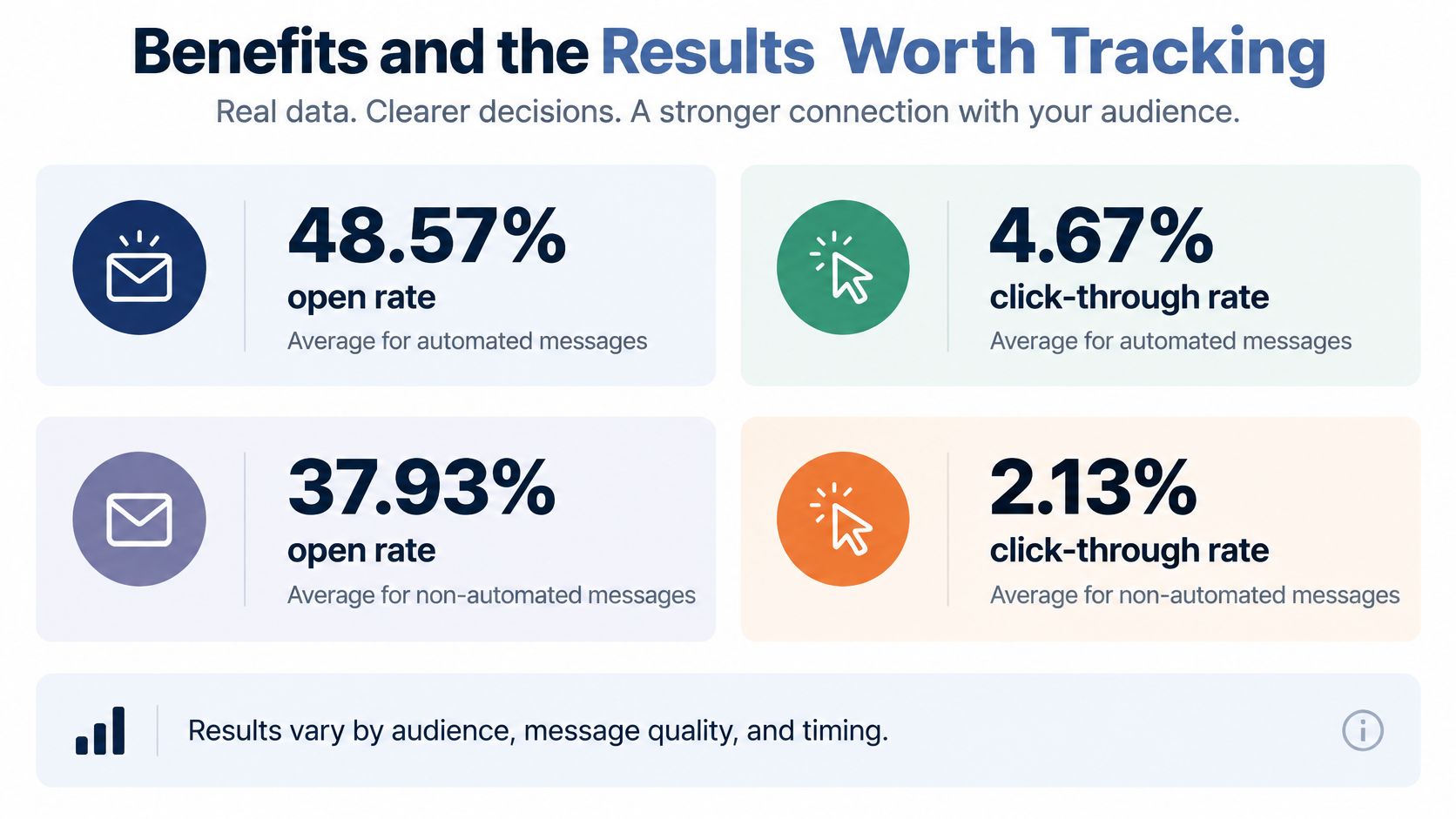
The clearest published comparison comes from a Stripo email automation benchmarks compilation drawn on large email datasets. Automated messages averaged a 48.57% open rate and a 4.67% click-through rate, against 37.93% and 1.29% for standard campaigns. Reported conversion was 1.49% for automated messages versus 0.08% for campaigns.
Why the gap appears, and why it is not a promise
A welcome, cart, renewal, or post-demo workflow fires at a relevant moment. A batch campaign mixes people who just asked for something with people who have not acted in months. That is targeting, not magic copy.
These figures are not a guaranteed uplift. Triggered flows often reach people who were already more motivated. Benchmarks also move with industry, consent practice, deliverability, and how conversion is attributed. Treat the Stripo compilation as a comparison to beat with your own data, not as a forecast.
How to check a result
Compare equivalent cohorts, define a conversion window, and suppress overlapping campaigns so one person is not in three sequences at once. Track qualified opportunities, revenue per recipient, unsubscribe rate, and incremental conversion. Open rate alone will flatter a curious audience that never buys. Other email marketing statistics are useful context, but the workflow's own cohort is the number that decides whether to keep the rule.
Three practical gains follow when the measurement holds. Manual follow-up shrinks. Response to what a customer just did gets faster. Every lead gets the same handling instead of whichever inbox happened to be open.
Misconceptions and Limits to Know Before You Start
The common assumption is that automation runs itself after setup week. It does not. Mapping processes, removing duplicate records, defining lifecycle stages, testing triggers, handling exceptions, and auditing deliverability all happen before the calendar gets quieter. Adding the software can increase work before it reduces work.
Smaller organizations name budget as their biggest technology barrier, at 34.9%, in the 2025 State of Your Stack Survey. Money is only one gate. Data integration and the ongoing care of the stack sit beside it.
What has to exist before a workflow is switched on
- Clean customer data: Duplicates merged, and one email per real person where the business can support that.
- Reliable connections: Forms, the store or booking tool, and the CRM pass the same contact both ways.
- Lifecycle stages: The team agrees what a new lead, an active customer, and a lapsed contact mean.
- Consent records: The reason you may email or text that person is stored, not assumed.
- A named reviewer: One person checks workflows every month, including bounces and suppressions.

Personalization and trust
A message that feels intrusive or wrong costs more than a generic one. Use behavior the business collected itself. Honor suppression and unsubscribe rules. Put a human approval step on sensitive campaigns, such as a win-back that mentions a health service or a missed payment. Be able to say why that contact was targeted.
An MDPI review of data-driven digital marketing treats privacy, explainability, fairness, and deceptive design as major themes, and the US picture is fragmented, with state regimes rather than one federal privacy law. Confirm what applies with counsel before a predictive score or a new channel goes live.
Watch three early warnings. Unsubscribe rates rise. The same person gets duplicate sends. People who already bought still get a pitch for that purchase.
Choose a Platform Against Your Workflow Map
Map every trigger, condition, and action before comparing logos. Action limits and contact limits influence the actual cost more than the headline monthly price. HubSpot's own pricing illustrates this clearly. Its marketing pricing page, checked in 2026, gives Starter one automated action on the lower tier and up to 10 on the next, while higher plans add unlimited actions and omnichannel automation. A short welcome can fit a tight action cap. Branching that also updates the CRM and routes a lead often cannot.
- List the three to five workflows needed in the next six months.
- Count active contacts and monthly sends.
- Note which channels each workflow uses.
- Check which CRM records must sync both ways.
- Confirm who will maintain the workflows and how many hours they have for setup.
| Plan | Vendor price | Limits that change cost | Source and date checked |
|---|---|---|---|
| Mailchimp free plan | $0 per month | 250 contacts, 500 sends per month, 250-send daily cap, no automations | Mailchimp pricing page, reported November 2026 |
| Mailchimp Essentials | From $13 per month | 500 contacts | Mailchimp pricing page, reported November 2026 |
| Mailchimp Standard | From $20 per month | Multi-step automations | Mailchimp pricing page, reported November 2026 |
| HubSpot Marketing Hub Professional | $800 per month annual or $890 monthly | Three core seats, 2,000 marketing contacts, 20,000 monthly sends, $3,000 one-time onboarding | HubSpot pricing page, checked 2026 |
| HubSpot Marketing Hub Enterprise | $3,600 per month | Higher tier with unlimited actions and omnichannel automation | HubSpot pricing page, checked 2026 |
Mailchimp is the lower-cost fit when a small business mainly needs email and simple automations. A vendor comparison of email platforms reports the free plan at 250 contacts and 500 sends a month, with a 250-send daily cap and no automations, Essentials from $13 per month for 500 contacts, and multi-step automations on Standard from $20 per month, attributed to Mailchimp's pricing page as current in November 2026. Anyone past 250 contacts, or anyone who needs a real journey, leaves the free tier.
HubSpot Marketing Hub Professional is the fit when marketing has to sit on a broader CRM stack and the team can fund onboarding. A HubSpot pricing guide lists $800 per month on annual billing or $890 monthly, three core seats, 2,000 marketing contacts, up to 20,000 monthly sends, and a one-time $3,000 onboarding fee, reported in 2026. At the annual price, subscription plus onboarding is about $12,600 in the first year before extra seats or contact charges. The same 2026 pricing page lists Enterprise at $3,600 per month.
TopToolAdvisor publishes shortlists of the best software for every business job and industry, grouped by function, such as CRM or help desk, and by industry, such as clinics or construction firms. Its email marketing software shortlist is a function list, not a substitute for the workflow map.
This week, write that map and shortlist two platforms against contact count, sends, and the actions each journey needs.
Write the three workflows you would run in the next six months, with the trigger and the record each one needs, then set them beside the Mailchimp and HubSpot limits above. When you want those plans compared with other tools on the same scoring method, start from the shortlists at TopToolAdvisor.
Questions or corrections: editorial@toptooladvisor.com