10 Best Employee Communication Apps for Frontline Teams of 2026
By the TopToolAdvisor research desk · Updated November 28, 2026 · Next review January 12, 2027 · 10 products scored
 Our pickConnecteamShift-based businesses with up to a few hundred staff9.1
Our pick in brief
Start with headcount and how staff sign in. Under 30 people, Connecteam is the cheapest full communications app at a flat $29 a month on yearly billing, or free up to 10 users. From about 50 to 1,000 people, Blink gives the best mix of reach and price, with SMS and QR code invites at $3.75 per user. If you already pay for Microsoft 365, price F1 licenses at $3.00 per user before adding a vendor. When the job is only shift changes, When I Work bundles messaging with scheduling at $2.50 per user. Above 1,000 staff, a quote from Staffbase, Flip or LumApps is worth the sales cycle.
Quick answer
Connecteam is the best communication app for frontline employees without company email in 2026: it is free for up to 10 users, and its Communications Hub costs $29 a month for the first 30 users on yearly billing. Blink suits mid-size employers at $3.75 per user per month with SMS or QR code sign-in, while Microsoft 365 companies can reach frontline staff with Viva Connections on the $3.00 F1 license; prices were checked as of November 2026. Enterprises with thousands of workers should get quotes from Staffbase, Flip or LumApps, which now includes Beekeeper.
This list is for operations and HR leads whose staff work shifts, drive, clean, cook or serve, and who cannot rely on company email to reach them. We compared documented features and published prices on each vendor's own pages on November 28, 2026, and scored ten apps on features, ease of use and value, weighted 35, 35 and 30 percent. For this list, features means mobile app depth, chat, read confirmations and translation; ease of use includes how staff join without an email address; value reflects the published per-user cost. Five vendors show a US dollar price; Staffbase, LumApps, Workvivo and Speakap sell by quote, and Flip publishes euros only, so their value scores are conservative.
At a glance
| Rank | Product | Best for | Verified price | Score |
|---|---|---|---|---|
| 1 | Connecteam | Shift-based businesses with up to a few hundred staff | From $29 per month for the first 30 users, annual billing | 9.1 |
| 2 | Blink | Companies of 50 to 1,000 with shift workers and no company email for them | From $3.75 per user per month, annual billing | 8.8 |
| 3 | Microsoft Viva Connections | Organizations already on Microsoft 365 that want to license frontline staff cheaply | From $3 per user per month (Microsoft 365 F1), annual billing | 8.1 |
| 4 | When I Work | Hourly teams that mainly need shift updates and team chat | From $2.50 per user per month | 8.1 |
| 5 | Flip | European and global employers with 50 to 300 frontline staff | Price not listed | 7.9 |
| 6 | MangoApps | Organizations of 200 or more that want comms and frontline operations from one vendor | From $4.50 per employee per month, annual billing | 7.9 |
| 7 | Staffbase | Enterprises with thousands of frontline workers and an internal comms team | Price not listed | 7.9 |
| 8 | LumApps (Beekeeper) | Enterprises that want one hub for office and frontline staff, including former Beekeeper customers | Price not listed | 7.6 |
| 9 | Speakap | Retail, hospitality and care employers that want a white-labeled app | Price not listed | 7.5 |
| 10 | Workvivo by Zoom | Zoom customers that want an engagement-led employee app | Price not listed | 7.5 |
By the numbers
- 61%Organizations piloting or implementing generative AI in HR rose from 19% in June 2023 to 61% in January 2025, according to Gartner surveys of 197 HR leaders.Source: Gartner
- 88%88% of HR leaders said their organizations had not realized significant business value from AI tools, in a July 2025 Gartner survey of 114 HR leaders.Source: Gartner
- 24%Only 24% of HR functions were maximizing the business value of their HR technology in 2024, according to a Gartner survey of 85 HR leaders.Source: Gartner
- 97.4%Jobscan detected an applicant tracking system for 97.4% of Fortune 500 companies in 2026.Source: Jobscan
- 291Recruiters on Ashby processed an average of 291 applications per hire in early 2026, compared with about 100 in early 2021.Source: Ashby
- $1,200The median cost per hire for nonexecutive roles was $1,200 in 2025, 27% lower than in 2017, according to SHRM.Source: SHRM
How the scores work
Each product is rated out of 10 on the same three criteria, then ranked by the weighted total. Scores compare documented features and published prices, not hands-on testing.
- 35%Features
- 35%Ease of use
- 30%Value
No. 1, our pick
ConnecteamAn all-in-one mobile app for deskless teams that combines chat, a company feed and a knowledge base with scheduling, time clock and HR tools.
9.1of 10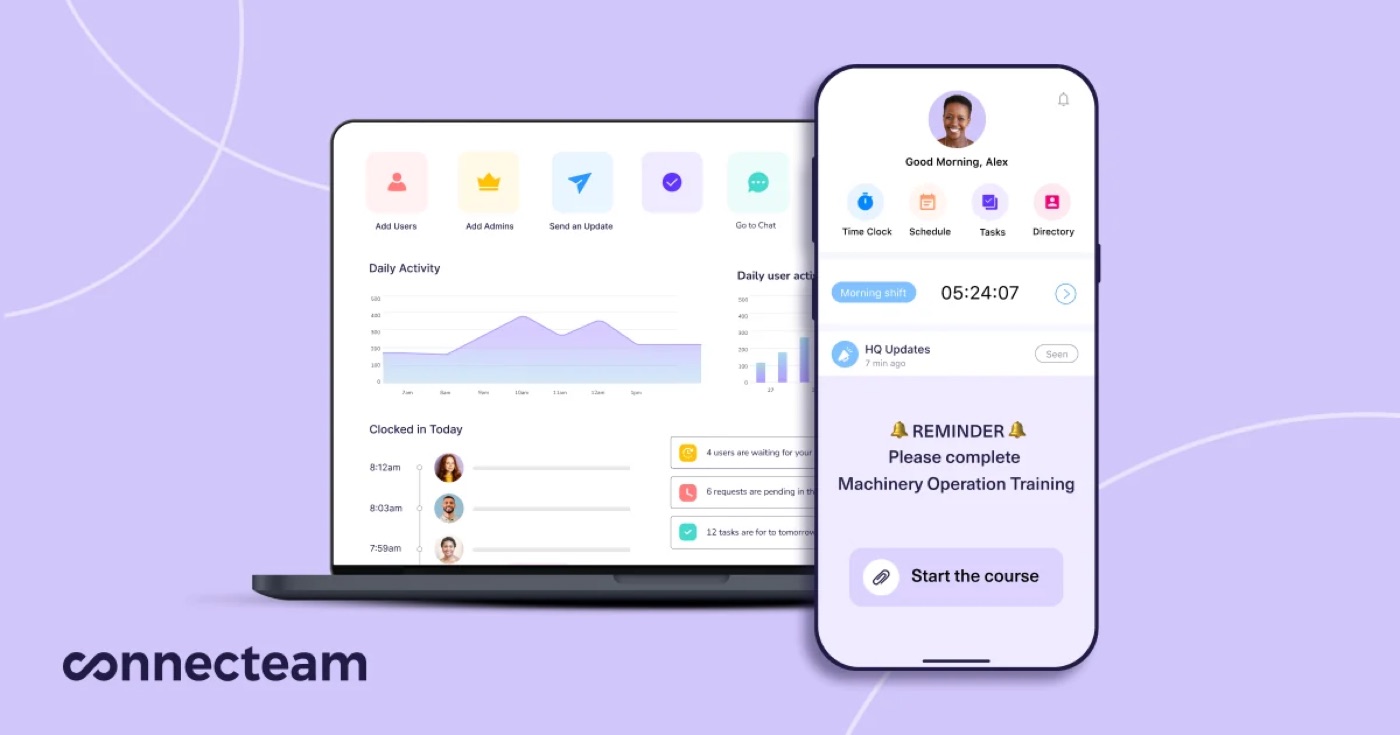
Best for Shift-based businesses with up to a few hundred staff
- Features
- 8.8
- Ease of use
- 8.9
- Value
- 9.6
Price
Free for up to 10 users; Communications Hub Basic from $29 per month for the first 30 users, billed yearly, then $0.50 per extra user
Quoted from the Connecteam pricing page on November 28, 2026:
Basic Kick-start with the essentials $ 29 /mo For the first 30 users
Connecteam is built for the owner or HR lead whose staff live on their phones rather than in email. The Communications Hub bundles chat, a company feed, a directory, surveys, events, a knowledge base and a help desk, and the pricing page lists it at $29 a month for the first 30 users on yearly billing. Past 30, each extra user on Basic costs $0.50 a month, so a 100-person crew pays about $64 a month. Teams of 10 or fewer can use every hub free on the Small Business Plan. The catch is that the features internal communicators care about most sit higher up: read confirmations on pop-up updates, scheduled feed posts and auto-translation of updates are Expert features at $99 a month for 30 users, and single sign-on is Enterprise only. Because scheduling and time clock live in a separate Operations Hub, buyers who want both should price two hubs.
Strengths
- +Flat $29 a month on yearly billing covers the first 30 users of the Communications Hub
- +Extra users cost $0.50 a month each on Basic yearly, so 100 users cost $64 a month
- +14-day free trial with no credit card needed
Drawbacks
- −Read confirmations and scheduled feed posts start on Expert at $99 a month for 30 users
- −Single sign-on and two-factor authentication are Enterprise only
- −Each hub is priced separately, so chat plus scheduling means two subscriptions
- Free plan
- Small Business Plan, up to 10 users
- Comms Basic
- $29 per month for 30 users, billed yearly
- Extra users
- $0.50 per user per month on Basic yearly
- Comms Expert
- $99 per month for 30 users, billed yearly
- Trial
- 14 days, no credit card
No. 2
 Blink
A mobile-first employee app with a feed, chat and knowledge hub, priced per user and built for staff without a work email.
8.8of 10Best for Companies of 50 to 1,000 with shift workers and no company email for them
- Features
- 8.6
- Ease of use
- 9.0
- Value
- 8.9
Price
Core from $3.75 per user per month billed annually; Pro from $5.00; Enterprise by quote
Quoted from the Blink pricing page on November 28, 2026:
Blink's Core plan starts at $3.75/user/month (billed annually), and Pro starts at $5.00/user/month.
Blink solves the reach problem first. Its pricing page describes passwordless sign-in through SMS, email or QR code invites with a one-time passcode, so a cashier or driver can join without a company mailbox, and a manager-led activation workflow with dashboards and nudges tracks who has not signed up yet. Core costs $3.75 per user per month on annual billing, or $4.50 month to month, and includes the feed, a knowledge hub, chat and in-app branding. Pro at $5.00 adds multi-language publishing with real-time translation, events with live streaming integration, user provisioning and an AI assistant. That makes Pro the realistic tier for multilingual sites. The trade-off against Connecteam is cost at small sizes: 30 people on Core cost $112.50 a month against Connecteam's flat $29, while Blink offers deeper communications tooling and no per-hub split.
Strengths
- +Invites need no email address, which matters for shop floors and depots
- +At $3.75 per user, 200 people cost $750 a month on annual billing
- +Core is $4.50 per user on monthly billing, so you can start without an annual contract
Drawbacks
- −Translation and user provisioning start on Pro at $5.00 per user
- −Enterprise is quote-only and holds the most advanced security controls
- −Per-user pricing grows faster than Connecteam's flat 30-user price at small headcounts
- Core
- $3.75 per user per month, billed annually
- Core monthly
- $4.50 per user per month
- Pro
- $5.00 per user per month, billed annually
- Sign-in
- SMS, email or QR code invite with OTP
- Free trial
- Yes
No. 3
 Microsoft Viva Connections
Microsoft's employee news and dashboard experience inside Teams, available to Microsoft 365 users with a Teams license, including the F1 frontline plan.
8.1of 10Best for Organizations already on Microsoft 365 that want to license frontline staff cheaply
- Features
- 8.0
- Ease of use
- 7.4
- Value
- 9.0
Price
Included with Microsoft 365 plans that have Teams; Microsoft 365 F1 costs $3.00 per user per month, paid yearly
Quoted from the Microsoft Viva Connections pricing page on November 28, 2026:
Microsoft 365 F1 $3.00 user/month, paid yearly (Annual commitment)
For a company that already runs on Microsoft 365, the cheapest way to reach frontline staff is often not a new app. Microsoft's Viva pricing page says Viva Connections is available to all Microsoft 365 or Office 365 enterprise plan users with a Teams license, and the Microsoft 365 F1 frontline plan costs $3.00 per user per month on an annual commitment. That buys Teams chat, calls and meetings, 2 GB of cloud storage per user and read-only Office apps, with Viva Connections as the news and dashboard layer. F3 at $10.00 adds editable web and mobile Office apps. The cost is effort, not license fees: Viva Connections draws its news from SharePoint, so a communications team must build and maintain sites and dashboard cards. Firms that want a ready-made branded app or email-free sign-up should compare Blink and Staffbase.
Strengths
- +F1 licenses at $3.00 per user per month give frontline staff Teams and Viva Connections
- +Uses the identity and security setup a Microsoft 365 company already runs
- +No new vendor contract for companies already licensed
Drawbacks
- −F1 rose from $2.25 to $3.00 per user per month on July 1, 2026
- −Someone must build the SharePoint sites and dashboard cards behind it
- −Viva Engage premium features need a separate Microsoft Viva suite license
- Microsoft 365 F1
- $3.00 per user per month, paid yearly
- Microsoft 365 F3
- $10.00 per user per month, paid yearly
- Licensing
- Microsoft 365 or Office 365 enterprise plan with Teams
- Storage on F1
- 2 GB of cloud storage per user
Visit microsoft.com|See the Microsoft Viva Connections profile
No. 4
 When I Work
An employee scheduling app for hourly teams that includes in-app team messaging on every plan.
8.1of 10Best for Hourly teams that mainly need shift updates and team chat
- Features
- 6.5
- Ease of use
- 8.8
- Value
- 9.0
Price
Essentials from $2.50 per user per month; Pro $5; Premium $8
Quoted from the When I Work pricing page on November 28, 2026:
When I Work pricing starts at just $2.50 per user per month for single-location teams, and $5 per user per month for multi-location businesses.
When I Work is on this list for one kind of buyer: a restaurant, store or clinic where most communication is about shifts. Its pricing page says every plan includes employee scheduling, time and attendance software and team messaging, and the Essentials plan lists in-app team messaging alongside OpenShifts and shift swapping. Pricing starts at $2.50 per user per month for single-location teams and $5 for multi-location businesses, with Premium at $8. That is the lowest per-user price on this list. What it does not offer is the communications layer of a true employee app: the pricing page lists no company feed, knowledge base, read receipts on announcements or surveys. If you need to publish policies, run campaigns or reach several thousand people, Blink or Connecteam is a better fit. If the job is to stop sending rota changes by text, it is enough.
Strengths
- +$2.50 per user per month for single-location teams
- +Messaging sits next to the schedule staff already check
- +Free trial covers two weeks
Drawbacks
- −No company news feed, knowledge base or surveys on the pricing page
- −Multi-location businesses pay $5 per user per month
- −Built for scheduling first, so broadcast announcements are basic
- Essentials
- $2.50 per user per month, single location
- Multi-location
- $5 per user per month
- Premium
- $8 per user per month
- Messaging
- Included on every plan
No. 5
 Flip
A frontline employee app with newsfeed, chat, calls, live translation and a knowledge base, sold as fixed packages up to 300 employees.
7.9of 10Best for European and global employers with 50 to 300 frontline staff
- Features
- 8.6
- Ease of use
- 8.2
- Value
- 6.6
Price
See vendor pricing (USD check pending)
We could not confirm a US price yet. Check the Flip pricing page.
Flip, now branded Flip AI, is one of the few dedicated frontline apps that publishes a package price at all. Its pricing page offers a Growth package for up to 300 employees with newsfeed and channels, direct and group chat, voice and video calls, live translation in more than 60 languages, a knowledge base, tasks, livestreaming and digital signage. Invite QR codes and inbound SSO with SCIM come on both tiers. Enterprise, for 300 employees and up, adds passwordless sign-in with passkeys, shared device login, and mini apps for shifts, absences and payslips. The page lists the Growth price per year in euros, and no US dollar price was shown when we checked, so treat cost as a quote for US budgets. Shared device login matters for kiosks and shared tablets, and it is only on Enterprise.
Strengths
- +Fixed, published packages for teams up to 300 employees
- +Voice and video calls and live translation are on the entry tier
- +QR code invites on every tier
Drawbacks
- −Prices are published in euros only, so a USD price could not be checked
- −Shared device login and HR mini apps are Enterprise only
- −Above 300 employees every deal is a custom quote
- Growth
- Up to 300 employees, fixed package
- Translation
- Live translation, 60+ languages
- Invites
- QR codes on all tiers
- Enterprise
- Custom quote, from 300+ employees
No. 6
 MangoApps
A modular employee platform whose Communications and Intranet pack includes news, sites, chat, surveys and recognition at a published per-employee rate.
7.9of 10Best for Organizations of 200 or more that want comms and frontline operations from one vendor
- Features
- 8.7
- Ease of use
- 7.4
- Value
- 7.6
Price
Communications and Intranet from $4.50 per employee per month billed annually, 200 employees minimum
Quoted from the MangoApps pricing page on November 28, 2026:
$4.50 per employee a month, billed annually 200 employees minimum
MangoApps prices its platform as packs, and the Communications and Intranet pack is the one that matters here. It costs $4.50 per employee a month on annual billing, with a 200-employee minimum, and bundles 13 apps: a Communications Hub with must-reads and urgent alerts, sites, wikis, surveys, peer recognition, libraries and chat across teams and locations. For a frontline business the pull is that the same vendor sells a Frontline Operations pack at $7 per employee with scheduling, time and attendance and task execution, so comms and shifts can share one login. The minimum is the obstacle for small firms, because the cheapest entry is $900 a month. The breadth also means more configuration than Blink or Connecteam, and buyers should plan a rollout rather than expect a same-day launch.
Strengths
- +Published price of $4.50 per employee a month on annual billing
- +Must-reads and urgent alerts are built into the Communications Hub
- +One vendor can add scheduling through the $7 Frontline Operations pack
Drawbacks
- −200-employee minimum puts the floor at $900 a month
- −Monthly billing raises the rate to $5.29 per employee
- −Many modules mean a longer setup than single-purpose apps
- Communications and Intranet
- $4.50 per employee per month, billed annually
- Minimum
- 200 employees
- Monthly billing
- $5.29 per employee per month
- Frontline Operations
- $7 per employee per month, billed annually
No. 7
 Staffbase
An enterprise employee communications platform with a branded mobile superapp, intranet and email, sold with dedicated frontline pricing.
7.9of 10Best for Enterprises with thousands of frontline workers and an internal comms team
- Features
- 9.2
- Ease of use
- 7.8
- Value
- 6.4
Price
Custom quote only; no public price
We could not confirm a US price yet. Check the Staffbase pricing page.
Staffbase is the enterprise option for organizations with an internal comms team and a large deskless workforce. Its pricing page offers a dedicated frontline plan with a branded superapp, push notifications and urgent alerts, an AI employee assistant, multi-language content, task management and digital signage, plus optional SMS communications and optional SSO through SAML and OIDC. HRIS integration with Workday, SAP SuccessFactors and others can provision users automatically, and data can be hosted in the United States, Australia or the European Union. Staffbase says it is a Leader in the 2026 Gartner Magic Quadrant for Frontline Worker Communications Applications. The trade-off is transparency: there is no price list, and the page says plainly that there is no generic price list because each quote is shaped to the workforce. Budget for a sales cycle and an implementation project.
Strengths
- +A dedicated frontline plan lets you pay only for what deskless staff need
- +Optional SMS reaches workers who never open the app
- +Named a Leader in the 2026 Gartner Magic Quadrant for Frontline Worker Communications Applications
Drawbacks
- −No price list; every deal is a tailored quote
- −SMS and SSO are listed as options, not standard
- −Aimed at enterprises, with over 1,500 enterprise customers
- Pricing
- Tailored quote
- Hosting regions
- United States, Australia, European Union
- Customers
- Over 1,500 enterprises
- Identity
- SSO via SAML and OIDC, HRIS provisioning
No. 8
 LumApps (Beekeeper)
An employee hub for desk and frontline staff; Beekeeper, the frontline app, is now part of LumApps.
7.6of 10Best for Enterprises that want one hub for office and frontline staff, including former Beekeeper customers
- Features
- 8.9
- Ease of use
- 7.6
- Value
- 6.2
Price
Custom quote only; no public price
We could not confirm a US price yet. Check the LumApps (Beekeeper) pricing page.
Buyers searching for Beekeeper will now land on LumApps: Beekeeper's site carries the banner that Beekeeper is now part of LumApps. The combined product describes a mobile-first frontline hub with shift scheduling, digital forms, secure chat with inline translation and HR self-service in one app, which it says is accessible without a corporate email or expensive license. LumApps adds an intranet for desk staff, microlearning and compliance courses, and connections to Microsoft, Google, ServiceNow, Workday and 50+ no-code app connectors. That breadth suits an enterprise that wants one platform for head office and stores. For a buyer comparing it with Connecteam, the gap is price transparency: LumApps publishes no price and sells through demos, while Connecteam lists $29 a month for 30 users. Ask about Beekeeper migration paths and roadmap in writing.
Strengths
- +Frontline staff can use it without a corporate email
- +Chat includes inline translation
- +Covers desk and frontline staff on one platform
Drawbacks
- −No published price
- −Beekeeper's own site now leads to LumApps, so buyers should confirm the product roadmap
- −Enterprise scope means a longer rollout than Blink or Connecteam
- Ownership
- Beekeeper is now part of LumApps
- Pricing
- Demo and quote
- Connectors
- 50+ no-code app connectors
- Sign-in
- No corporate email needed for frontline
No. 9
 Speakap
A frontline communication platform with a timeline, news with acknowledgement, chat and branded mobile apps on higher tiers.
7.5of 10Best for Retail, hospitality and care employers that want a white-labeled app
- Features
- 8.2
- Ease of use
- 8.0
- Value
- 6.2
Price
Custom quote only; no public price
We could not confirm a US price yet. Check the Speakap pricing page.
Speakap targets employers who want their own app in staff pockets. The Basic plan covers a timeline with polls, video, images and files, news with acknowledgement, a people directory, role-based permissions, 1-1 and group chats, events and group spaces. Premium, which Speakap calls its most popular plan, adds fully branded white-labeled apps for iOS and Android, HR system sync, auto-translation into 100+ languages and single sign-on. Premium Plus adds a custom domain, task management, journeys, an integrations marketplace and open API, and named account management. The compliance list on the pricing page is long: ISO 27001, SOC II Type 2, GDPR, CCPA and HIPAA, with hosting under a BAA on request. The drawback is that every plan says Get a Quote, so there is no way to compare cost with Blink or Connecteam without a sales call.
Strengths
- +News with acknowledgement shows who has confirmed reading
- +Branded app on Premium
- +Lists ISO 27001, SOC II Type 2, GDPR, CCPA and HIPAA compliance
Drawbacks
- −Every tier is Get a Quote
- −Translation and SSO need Premium
- −Open API and task management are Premium Plus only
- Plans
- Basic, Premium, Premium Plus
- Pricing
- Quote on every plan
- Translation
- 100+ languages on Premium
- Compliance
- ISO 27001, SOC II Type 2, GDPR, CCPA, HIPAA
No. 10
 Workvivo by Zoom
An employee experience platform from Zoom with news, campaigns, push notifications, livestreams and chat built on Zoom's Video SDK.
7.5of 10Best for Zoom customers that want an engagement-led employee app
- Features
- 8.8
- Ease of use
- 7.6
- Value
- 6.0
Price
Custom quote only; no public price
We could not confirm a US price yet. Check the Workvivo by Zoom pricing page.
Workvivo is Zoom's employee experience product, and its pricing page reads more like a menu than a price list. Workvivo HQ bundles news articles, a smart activity feed, campaigns, push notifications to mobile or email, auto-translation, livestreams with AI summaries, newsletters, recognition and knowledge pages. Real-time chat, built on Zoom's Video SDK with messaging, voice and video calls, is sold as an add-on, as is Workvivo TV digital signage for frontline locations and shared spaces. Seer, the feedback product, can be bought without HQ. For frontline buyers the questions are cost and reach. No price is published, so every deal needs a proposal, and the add-on model means chat can raise the quote. Companies that want engagement content, recognition and video in one place fit well; those that want low-cost shift messaging fit less well.
Strengths
- +Chat and calls run on Zoom's Video SDK
- +Strong engagement tools: shoutouts, badges, podcasts and livestreams
- +Digital signage reaches staff without devices
Drawbacks
- −No public price; the page asks for a custom package
- −Real-time chat and digital signage are listed as add-ons
- −Feature depth is aimed at internal comms teams more than small operators
- Pricing
- Custom package by quote
- Core product
- Workvivo HQ
- Add-ons
- Agentic search, real-time chat, digital signage, analytics
- Owner
- Workvivo by Zoom Limited
What to check before you buy
Check how people join without a work email
Reach is the whole point. Blink invites by SMS, email or QR code with a one-time passcode, Flip offers QR code invites on every tier and LumApps says its frontline app needs no corporate email. Microsoft 365 F1 is licensed per user, so each worker needs an account in your Microsoft 365 tenant.
Price at your real headcount
At 100 users on yearly billing, Connecteam Communications Basic costs about $64 a month, Blink Core $375, Microsoft 365 F1 $300 and When I Work Essentials $250. MangoApps has a 200-employee minimum, so its floor is $900 a month at $4.50 per employee.
Find out which tier has read confirmations
For safety notices and policy updates you need proof of reading. Connecteam puts pop-up updates with read confirmation on Expert at $99 a month for 30 users, Speakap includes news with acknowledgement on Basic, and MangoApps lists must-reads in its Communications Hub.
Plan for languages
Multilingual crews need translation in the app. Flip lists live translation in 60+ languages on its entry package, Speakap auto-translates into 100+ languages on Premium, Blink adds real-time translation on Pro at $5.00 per user and Connecteam auto-translates feed updates on Expert.
Decide if chat and scheduling belong together
Connecteam, MangoApps and When I Work sell scheduling and messaging from the same vendor, which cuts the number of apps staff install. Connecteam and MangoApps price them as separate hubs or packs, so add both lines to your budget.
Common questions
- What is the best communication app for frontline employees without company email?
- Connecteam is the best pick for most small and mid-size frontline teams. It is free for up to 10 users and its Communications Hub costs $29 a month for the first 30 users on yearly billing. Blink is the stronger choice at 50 to 1,000 people because staff join by SMS or QR code with a one-time passcode.
- Is Connecteam or Beekeeper better for deskless teams?
- Connecteam is better for small and mid-size teams that want a published price, at $29 a month for the first 30 users. Beekeeper is now part of LumApps, which sells by quote and suits enterprises that want one hub for office and frontline staff with translated chat and HR self-service.
- How much do employee communication apps cost per user?
- Published prices run from about $0.50 to $5.00 per user per month as of November 2026. Connecteam charges $0.50 per extra user after its $29 base, When I Work starts at $2.50, Microsoft 365 F1 at $3.00, Blink Core at $3.75 and MangoApps at $4.50 with a 200-employee minimum. Staffbase, Speakap, Workvivo and LumApps quote on request.
- Is there a free employee communication app for frontline workers?
- Yes, Connecteam's Small Business Plan is free for life for up to 10 users and includes every hub. Teams of 10 to 30 can use Connecteam's Limited plan after the 14-day trial, which keeps the essentials free.
- Can Microsoft Teams work for frontline staff?
- Yes, Microsoft 365 F1 includes Teams chat, calls and meetings for $3.00 per user per month paid yearly. Microsoft says Viva Connections is available to Microsoft 365 or Office 365 enterprise plan users with a Teams license, so F1 users get the news dashboard too.
- Which frontline app translates messages?
- Flip, Speakap, Blink and Connecteam all document translation. Flip lists live translation in 60+ languages on its Growth package, Speakap translates into 100+ languages on Premium, Blink translates on Pro and Connecteam auto-translates feed updates on Expert.
Sources and price checks
- Connecteam: https://connecteam.com/pricing/, price checked November 28, 2026
- Blink: https://www.joinblink.com/pricing, price checked November 28, 2026
- Microsoft Viva Connections: https://www.microsoft.com/en-us/microsoft-365/enterprise/f1, price checked November 28, 2026
- When I Work: https://wheniwork.com/pricing, price checked November 28, 2026
- Flip: https://getflip.com/pricing/, price not confirmed as of November 28, 2026
- MangoApps: https://www.mangoapps.com/pricing, price checked November 28, 2026
- Staffbase: https://staffbase.com/en/pricing, price not confirmed as of November 28, 2026
- LumApps (Beekeeper): https://www.lumapps.com/pricing, price not confirmed as of November 28, 2026
- Speakap: https://www.speakap.com/en/pricing, price not confirmed as of November 28, 2026
- Workvivo by Zoom: https://www.workvivo.com/pricing/, price not confirmed as of November 28, 2026
Fact sources
- Gartner, Gartner Announces Top Trends Shaping HR Priorities in Australia in 2026
- Gartner, Gartner Survey Shows 88% of HR Leaders Say Their Organizations Have Not Realized Significant Business Value from AI Tools
- Gartner, Gartner Survey Reveals Only 24% of HR Functions Are Maximizing the Business Value from HR Technology
- Jobscan, Applicant Tracking System Usage Report: Fortune 500 Companies
- Ashby, Recruiter Productivity, Talent Trends Report
- SHRM, 2025 Recruiting Benchmarking: Insights to Maximize Recruitment (data brief)
Cite this page
TopToolAdvisor. "10 Best Employee Communication Apps for Frontline Teams of 2026." Updated November 28, 2026. https://toptooladvisor.com/best/best-frontline-employee-communication-apps
Questions or corrections: editorial@toptooladvisor.com
See our editorial policy. Vendors update prices without notice, so confirm on their site first.