Guide · General
2026 TCO Breakdown: Cloud Erp vs on Premise Erp
Compare cloud erp vs on premise erp on deployment, cost, maintenance, security and scalability, with 2026 TCO models and a clear verdict by business size.
By the TopToolAdvisor research desk · Updated November 14, 2026 · 14 min read
Cloud ERP is no longer the challenger. Grand View Research's cloud ERP market estimate put the global market at $92.8 billion in 2025, with a projection of $104.9 billion in 2026 and $251.8 billion by 2033, a 13.3% compound annual growth rate from 2026 through 2033. That forecast is the strongest general argument for cloud, and it settles nothing for a specific buyer with 340 users, two plants and a custom pricing engine.
The verdict from this research desk is blunt. For most companies under a few hundred users, with a lean IT team, more than one site or plans to grow, cloud ERP is the correct default. On-premise ERP stays defensible in three narrow cases: hard data-sovereignty or regulatory constraints, highly customized processes that are stable and unlikely to change, and very large standardized deployments of 5,000 or more users where owning infrastructure beats renting it.
The method is multi-year total cost, not the first invoice. Every number below comes from a published TCO model, a peer-reviewed comparison or a public-sector assessment, and each section closes with the specific check to run before anyone signs.
Table of Contents
- Cloud ERP vs On-Premise ERP at a Glance
- Deployment and Implementation Timelines
- Cost and Total Cost of Ownership
- Maintenance and Upgrade Responsibilities
- Security, Control and Compliance
- Scalability and Performance Under Growth
- Which ERP Deployment Fits Your Business
Cloud ERP vs On-Premise ERP at a Glance
Cloud ERP runs in data centers the software vendor operates, on a subscription that bundles hosting, patching and standardized upgrades. On-premise ERP runs on servers the buyer owns or controls, which places upgrades, availability, security operations and technical maintenance on the internal team.
Name the products early, because each one anchors a different part of the argument. Infor CloudSuite is the cloud system at the center of a 2023 state assessment that priced a move off self-run infrastructure. SAP is the subject of a peer-reviewed comparison that scored cloud and on-premise deployments against the same criteria. Acumatica publishes the 2024 total-cost guide built on the 180 Systems model, and Oracle's total-cost analysis underpins much of the timeline evidence buyers quote. Different vendors, same three variables: user count, customization depth and who carries the operational risk.
| Criterion | Cloud ERP | On-premise ERP | Best fit |
|---|---|---|---|
| Deployment | Provider-hosted tenant, live in months | Customer servers, longer build | Cloud for speed |
| Upfront cost | Implementation and subscription, no hardware purchase | Perpetual license, servers and implementation | Cloud for cash flow |
| Ongoing cost | Per-user and module fees that rise with usage | Maintenance, IT staff and hardware refresh | Cloud under a few hundred users, on-premise past 5,000 |
| Maintenance | Vendor patches and upgrades on its release schedule | Internal IT owns patching, backups and upgrades | Cloud for lean IT teams |
| Security and control | Shared responsibility, provider certifications | Full customer control of data and infrastructure | On-premise where residency rules bind |
| Scalability | Users, modules and compute added on demand | Capped by owned hardware headroom | Cloud for growth |
| Best for | Small to midsize, multi-site, fast-growing | Regulated, deeply customized, very large | Match to control needs |
Read that grid as a map of the trade, not a scorecard. Cloud concentrates spending in a predictable subscription and removes the infrastructure project; on-premise concentrates spending at the start and then keeps charging through maintenance, staff time and refresh cycles. Neither column is cheaper by definition, and any vendor deck that claims otherwise is comparing different scopes.
The way to use this comparison is to score both models on the same five-year horizon, then stress it. Recalculate at 1.5 times and twice today's user count, because headcount growth is where cloud subscriptions escalate and where on-premise hardware headroom runs out. Ask which line items each proposal includes, since hosting and database administration sit inside a subscription in one model and inside a job description in the other.
The rule that decides most deals: model four years at minimum, and book internal IT labor in the on-premise column even when those salaries are already on payroll.
First question for any vendor: which environments are included, meaning production, test, sandbox and disaster recovery, and what does each extra one cost per year.
Deployment and Implementation Timelines
Two implementations of identical scope don't take identical time. Cloud removes the infrastructure phase, not the configuration phase, and that difference explains most of the calendar gap.
The two paths split early and stay apart until testing.
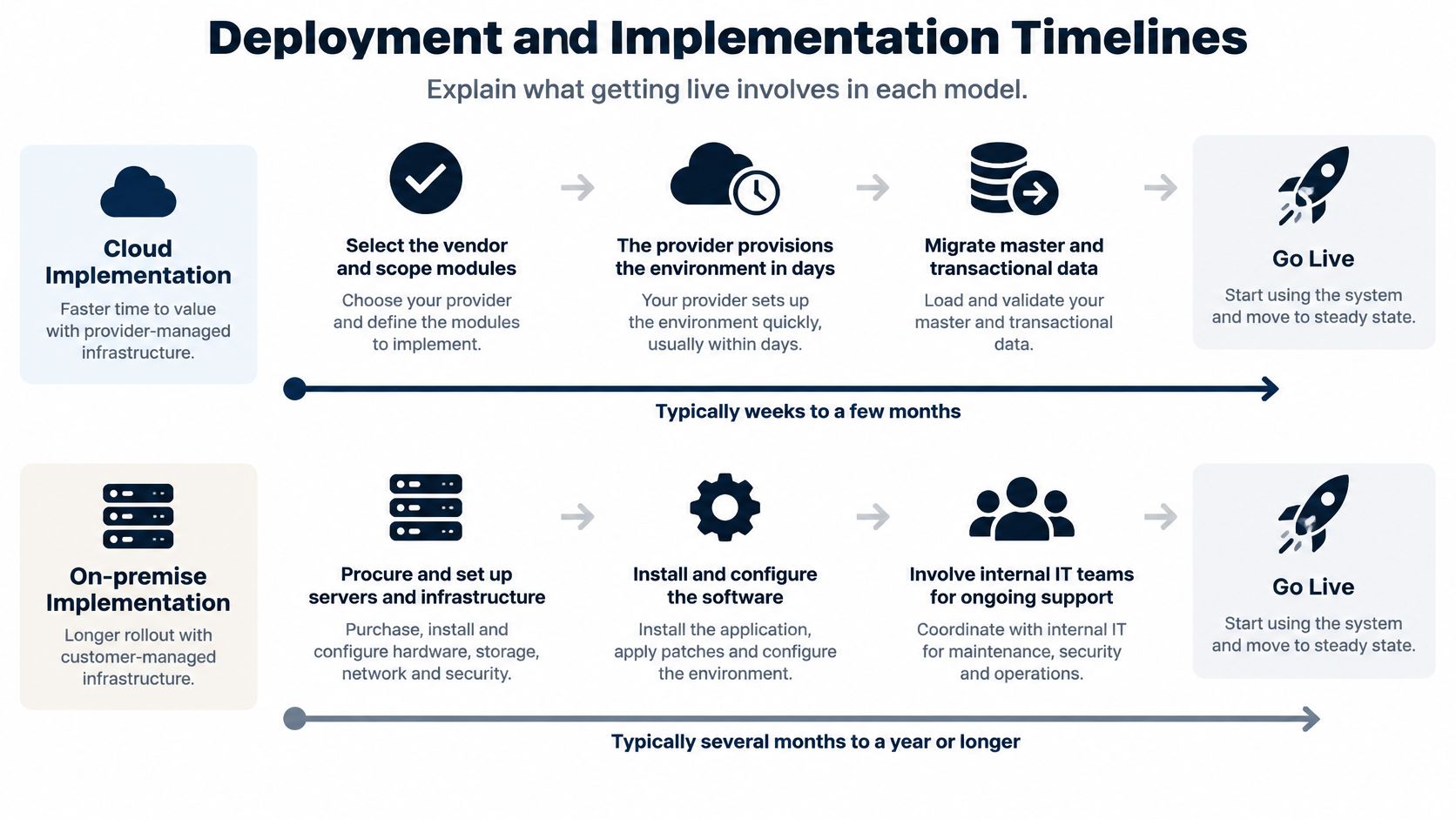
Six phases from selection to go-live
- Select the vendor and scope modules. Identical work in both models, and the phase where most schedules slip. A module list agreed in writing before contracting saves weeks later.
- Provision the environment. In cloud, the provider stands up the tenant in days. On-premise adds hardware procurement, server and network build, database installation and storage sizing, often with a systems integrator on site.
- Migrate master and transactional data. Chart of accounts, items, customers, open orders and history. Both models carry this cost, and the on-premise version rarely runs faster because the legacy database is usually on the same network.
- Configure workflows and approve customizations. Cloud configuration stays inside supported tooling; on-premise customization can reach into the code, which buys flexibility and adds a permanent maintenance obligation.
- Integrate payroll, CRM, e-commerce and banking. Integration work scales with the number of systems, not the deployment model. Count the endpoints before believing any timeline.
- Test, train and go live. User acceptance testing, data reconciliation and training consume the same weeks either way.
The Idaho Office of the State Auditor's 2023 market analysis presentation, citing Oracle's total-cost analysis, reported cloud ERP implementation at about six months against about 12 months for an on-premise solution, with total cost of ownership as much as 46% lower and cloud costing up to 50% less over four years for a 100-employee company. Those are referenced vendor-analysis figures, not an independent benchmark, so request the assumptions behind them: user count, modules, integrations, migration scope, customization budget and internal labor.
Put this in the request for proposal: the number of assumed integrations, the data volume to migrate, and the hours of customization included in the quoted timeline.
After go-live the split widens. Cloud tenants receive vendor-scheduled release trains whether the business wants them or not; on-premise teams choose their own upgrade windows, which is the trade examined next.
Second question before signing: who owns data migration cleanup when source records fail validation, and is that work inside the quoted fixed fee or billed hourly.
Cost and Total Cost of Ownership
Compare at least four years, preferably five, and include internal IT labor. A comparison that sets a subscription fee against a license fee and stops there will point the wrong way almost every time.
The cleanest published line-item model for a small team is the 180 Systems comparison reproduced in Acumatica's 2024 ERP total-cost guide, built at 20 users.
| Cost item | On-premise ERP (20 users) | Cloud ERP (20 users) |
|---|---|---|
| Initial license | $60,000 perpetual | Included in subscription |
| Annual subscription | Not applicable | $28,800 per year |
| Maintenance and support | $12,000 per year | Included in subscription |
| Infrastructure and administration | $50,000 per year | Included in subscription |
| Implementation and training | $60,000 one-time | $57,600 one-time |
| Four-year total as published | $428,000 | $230,400 |
Run the arithmetic before quoting those totals anywhere. The on-premise rows sum to $60,000 + (4 × $12,000) + (4 × $50,000) + $60,000 = $368,000, and the cloud rows sum to (4 × $28,800) + $57,600 = $172,800. The published totals sit $60,000 and $57,600 above the printed line items, which suggests additional years or one-time items that the excerpt doesn't show. The direction of the result holds, but a buyer should ask the model's owner which costs sit in that gap before presenting either number to a board.
What the picture looks like at 100 users
An ERP Research model published by Godlan puts five-year TCO at roughly $600,000 to $1.3 million for cloud and $750,000 to $1.8 million for on-premise at 100 users, and that on-premise range already includes one major upgrade. Add a second upgrade, a hardware refresh or a database administration hire and the upper bound moves further out.
The structure of the cost matters more than the total
ISCAP's 2012 study of cloud-computing economics reported consulting, training and implementation at about 35% of cloud total cost of ownership, against initial capital expenses averaging 74% of ownership cost for on-premise ERP, and cited roughly 50% savings over four years for small and midmarket adopters. Treat those percentages as the shape of the trade rather than a 2026 price benchmark, because a decade of subscription pricing has moved since.
Two lists decide whether the comparison survives contact with year three. On the cloud side, watch user growth, premium modules, storage above plan, integration work and renewal increases. On the on-premise side, budget hardware refresh, database administration, upgrade projects, security operations and backup and disaster-recovery testing.
TopToolAdvisor warns that vendors update prices without notice and advises confirming every figure on the vendor's own site first. The line items above come from a 2024 published model, so they are a starting structure, not a quote. For the adjacent software that usually sits beside an ERP rollout, TopToolAdvisor's accounting software cost breakdown shows how the same discipline is applied to published vendor prices.
Third question before signing: does the subscription price lock for the contract term, and what index or percentage governs increases at renewal.
Maintenance and Upgrade Responsibilities
Recurring work is where the two models differ most in daily life. In cloud ERP the vendor runs hosting, patching, backup infrastructure and standardized upgrades on a published schedule. The customer still owns data validation, integration regression testing, user training on each release, and compatibility of every customization and report.
On-premise ERP keeps all of it in-house: database administration, security patching, hardware refresh cycles, backup and disaster-recovery testing, and a major upgrade project every few years. The 20-user model in the previous section captures the shape of that burden, with maintenance and support billed every year against a one-time license.
A public-sector number that shows the shift
The North Dakota Legislative Council's 2023 ERP assessment estimated that replacing the existing environment with Infor CloudSuite would cut annual ongoing ownership cost from $8.214 million to $2.227 million, a reduction of about $5.987 million. Applications support and hosting fell from $6.9 million to $1.9 million, integration support from $827,000 to $327,000, database administration from $124,000 to zero, and annual investment in upgrades and patching from $363,000 to zero.
Those are estimates for one state's assessed environment, not a savings rate any company should copy into a business case. What transfers is the line structure: the recurring cost of running the system is made of hosting, database administration, integration support and upgrade labor, and a cloud contract either absorbs those lines or leaves them with the buyer. Read the proposal line by line and mark each one.
Budget for what stays: every responsibility that moves to the vendor in a cloud deal is a cost the on-premise budget has to carry, year after year, whether or not it appears in the license quote.
Watch for the responsibilities that remain with the customer in a cloud contract: integration regression testing after each release, rework of custom reports when a vendor changes an API, internal help desk for user issues, and data quality ownership. Teams that forget these lines get a surprise in the first upgrade cycle.
Fourth question before signing: which party patches what, on what schedule, and how many releases per year require the customer to retest integrations.
Security, Control and Compliance
Security isn't a reason to pick a side. It's a reason to ask sharper questions, because both models shift risk rather than eliminate it.
Cloud ERP moves infrastructure defense to a provider with dedicated security operations and audited data centers, and standardized patching closes known vulnerabilities faster than most internal teams can. The same model adds concentration risk, dependence on connectivity, and less say over when releases land and what they change.
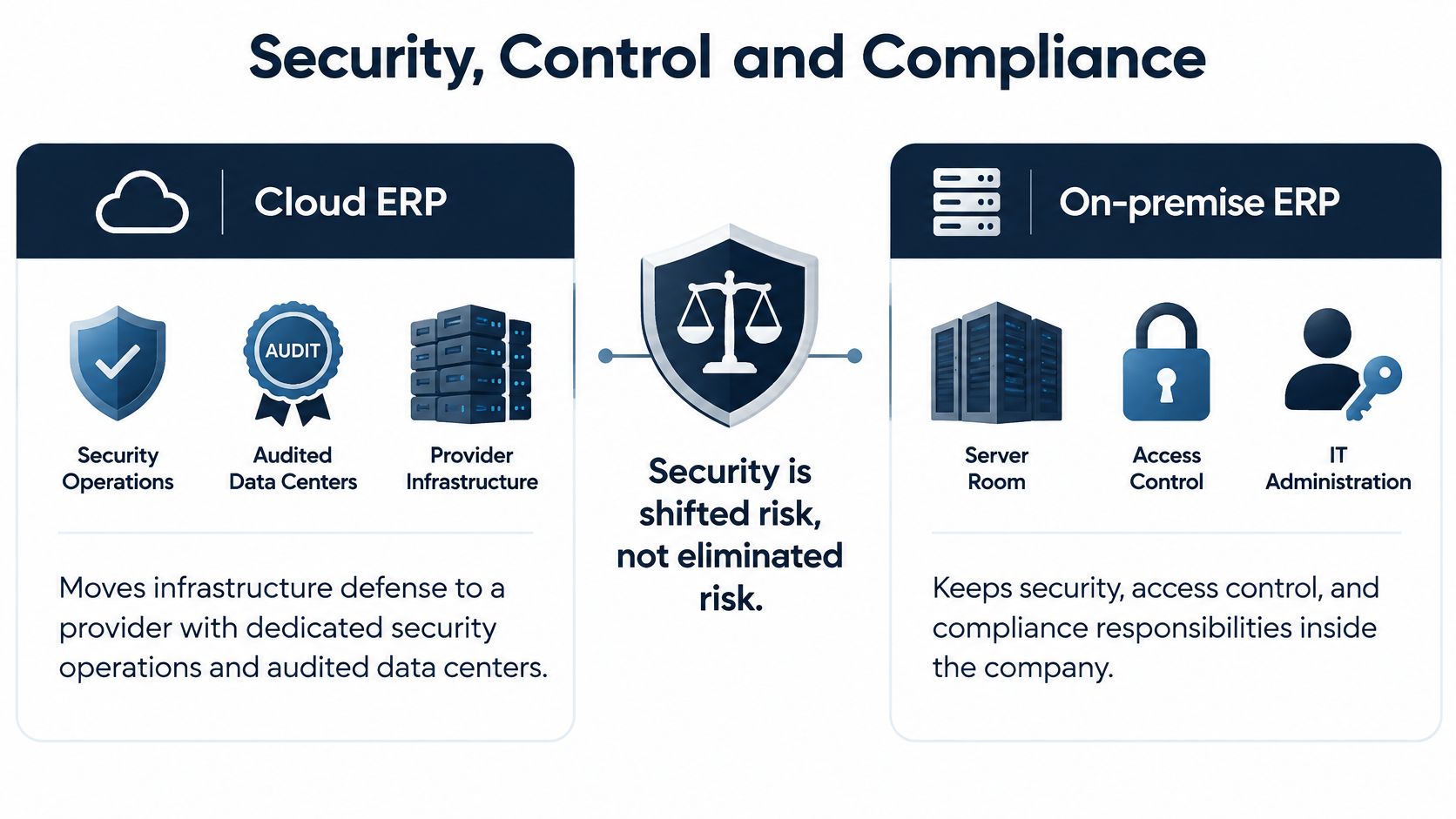
On-premise ERP gives direct control over hosting location, network placement, encryption keys and change windows. The buyer also owns patching latency, backup verification, disaster-recovery testing and the security staffing to run all of it, which is a real cost line in any organization without a mature infrastructure team.
Seven questions to put in writing
- Data location: which countries host production data and backups, and how residency rules apply to each subsidiary or plant.
- Encryption keys: who generates, holds and can revoke them, and whether customer-managed keys are available.
- Audit-log export: what format logs leave in, how often, and whether a regulator can receive them directly.
- Recovery objectives: the stated recovery point objective and recovery time objective, with the test results that prove them.
- Outage procedure: what the customer can still do when the provider is unavailable, including offline capture for warehouse or plant activity.
- Release control: how much notice precedes a mandatory upgrade and whether a delay is negotiable.
- Exit assistance: what data extraction, format and migration support the contract guarantees when the relationship ends.
ERP Today's 2025 ERP research notes that cloud migration increasingly requires parallel investment in security, auditing, policy automation and cloud-native governance, because organizations have to preserve auditability and control after workloads move off-site. That investment is the part most migration budgets miss.
A vendor can be genuinely secure and still leave a buyer without the evidence a regulator demands. Score security, control and resilience as three separate items.
Fifth question before signing: which certifications the provider holds today, which audit reports the buyer will receive annually, and what notification window applies after a breach.
Scalability and Performance Under Growth
Cloud ERP scales by configuration. Adding 40 warehouse users, a second distribution site or an extra 20% of transaction volume is a licensing and setup change, not a capital project, and every location stays on the same release.
On-premise ERP scales by capacity planning. Growth means hardware headroom, license true-ups, database tuning and, eventually, a refresh project, and it buys direct control over latency for local or latency-sensitive workloads. Companies that outgrow the server before they outgrow the software face an unplanned capital cycle in the middle of an operating year.
The peer-reviewed comparison of cloud and on-premise SAP deployments in Springer's 2025 study found cloud stronger on scalability and lower initial cost, while on-premise delivered greater infrastructure control and potentially more predictable long-term costs but with scalability challenges. The finding maps to operating model: providers expand capacity behind a standard interface, while internal teams expand it by buying, installing and tuning.
Convert claims into commitments
"Scalable" means nothing in a contract. For a cloud proposal, require the availability target, response-time objectives for critical transactions, recovery point and recovery time objectives, integration throughput, and maximum supported concurrent users, each with the measurement method. For on-premise, require documented upgrade frequency, patch latency, available hardware headroom and the date of the last successful disaster-recovery test.
Buyers who want the wider adoption picture behind these capacity decisions can review TopToolAdvisor's cloud computing statistics, which links each figure to its original publisher.
The growth-stage rule is the same one that governs every other line in this analysis. Buy for the next three years of users and transaction volume, not for today's headcount, and write the thresholds into the contract so a surge in orders doesn't trigger a renegotiation.
Scale test that costs nothing: take the busiest transaction in the business, ask what happens to its response time when volume doubles, and request a reference site at that size.
Sixth question before signing: what user and transaction ceiling applies to the quoted tier, and what the price does at the first tier boundary.
Which ERP Deployment Fits Your Business
For most small and midsize businesses, especially those under a few hundred users with a lean IT team, more than one location or growth plans, cloud ERP is the default and the recommendation. Lower upfront spend, faster deployment and no infrastructure to operate outweigh the long-run control that on-premise offers, and that trade holds even when subscription costs climb.
The exceptions have numbers attached. VendorBenchmark's cloud versus on-premise pricing analysis reports cloud running 20% to 45% cheaper for mid-market deployments, while on-premise can become cost-competitive for very large implementations of 5,000 or more users with limited customization. The same analysis puts annual cloud cost growth at 10% to 15% as organizations add users and modules, with customization and integration consuming 8% to 15% of annual subscription spend, and places implementation at roughly 30% to 50% of total ERP expenditure in some mid-market scenarios. Those are the numbers that flip a large, stable, standardized enterprise toward owning infrastructure.
| Your situation | Better fit | Why |
|---|---|---|
| Fast growth, new sites or acquisitions | Cloud | Capacity and new entities added without hardware projects |
| Regulated industry or data-sovereignty limits | On-premise | Direct control of residency, keys and audit logs |
| Deeply customized, stable processes | On-premise | Change windows and upgrade timing stay in-house |
| 5,000 or more users, standardized processes | Model both | On-premise can be cost-competitive at this scale |
| Existing data center and skilled IT staff | Model both | Owned infrastructure lowers incremental on-premise cost |
Product fit follows the same logic. Infor CloudSuite suits public-sector and asset-heavy organizations that want a standardized cloud suite at scale. SAP suits large deployments where both models deserve a full cost model, because the license and infrastructure variables are big enough to swing the answer. Acumatica and Oracle are the cloud options to shortlist for mid-market buyers who want subscription pricing without a hardware phase.
On pricing, TopToolAdvisor lists prices as the cheapest paid plan in US dollars, as shown on the vendor's page on the date it checked, which is the only honest way to quote a number that vendors change without notice. Rather than repeat a starting price that may already be stale, confirm each figure on the vendor's own pricing page and record the date beside it. Buyers comparing entry-level options can start with TopToolAdvisor's ERP picks for small business and work upward from there.
Three steps finish the decision. Build a five-year and a ten-year model using this year's user count, next year's plan and a stressed case at double the users. Get the security, service-level and exit answers from earlier sections back in writing, not in a slide. Then compare the two or three shortlisted products on identical scope, because the deployment model rarely changes the answer as much as a mismatch between modules and how the business works.
Run the numbers before the demo, not after. Take the 20-user and 100-user cost structures on this page, rebuild them with your own headcount, module list and integration count, and extend the model to ten years with a 10% annual subscription escalation in one column and a hardware refresh in the other. Send the seven security questions and the service-level commitments to every shortlisted vendor in the same email, then compare the written answers side by side. When the shortlist is ready, put Acumatica, Oracle, SAP and Infor CloudSuite through TopToolAdvisor's ERP comparison, confirm each starting price on the vendor's own pricing page on the day you read it, and keep the date beside the number so the business case survives its first renewal.
Questions or corrections: editorial@toptooladvisor.com