Guide · General
Accounting Software Cost: Plans, Add-ons and Real Totals
Accounting software cost by tier, add-on and business size, with vendor prices checked in 2026 and the hidden costs that change your total.
By the TopToolAdvisor research desk · Updated November 13, 2026 · 13 min read

The advertised price of accounting software is a starting number, not a budget. A 2025 accounting-technology survey reported in Fit Small Business's comparison of small-business accounting software found that 73% of surveyed SMEs spend between €1,000 and €10,000 a year on accounting software. The spend rarely matches the number on the pricing page, and the distance between the two is driven by line items the page never mentions.
What follows is a research desk's read on accounting software cost: vendor list prices with the date each was checked, twelve-month arithmetic that includes minimum commitments, and plain notes on what a monthly figure leaves out. Vendor prices are tied to the named pricing page and check date, and each market statistic is tied to its named publisher. No product was tested and no vendor was consulted about the totals computed here.
One pattern holds across every vendor examined: the cheapest base plan is often not the cheapest operating choice. Seats, payroll, payment processing, extra modules and the upkeep of integrations decide the annual bill far more than the entry price does. A lower list price that forces a paid add-on can cost more over twelve months than a higher tier that includes the feature.
Table of Contents
- Accounting Software Prices at a Glance
- Pricing Units and Price Ranges
- Add-ons That Change the Bill
- Annual Totals and Payroll Add-ons
- Matching Tiers to Your Business Situation
- Records Features That Protect the Purchase
- Confirm the Full Annual Cost Before You Sign
Accounting Software Prices at a Glance
Two vendors publish US-dollar pricing pages that can be read side by side on the dates shown, and between them they cover the entry point most small businesses start from and the tiers they move to once a second user, a second entity or a payroll run appears.
| Product and tier | Displayed monthly price | Scope stated by vendor | Price checked |
|---|---|---|---|
| QuickBooks Online Simple Start | $38 per month, $19 for first three months | One user, real-time profit and loss reporting | November 5, 2026 |
| QuickBooks Online Essentials | $85 per month, $42.50 for first three months | Step up from Simple Start | November 5, 2026 |
| QuickBooks Online Plus | $140 per month, $70 for first three months | Step up from Essentials | November 5, 2026 |
| QuickBooks Online Advanced | $340 per month, $170 for first three months | Highest QuickBooks tier in the displayed range | November 5, 2026 |
| Sage 50 Pro Accounting | $132.17 per month | One user, one-year minimum commitment | October 30, 2026 |
| Sage 50 Premium Accounting | $182.50 per month | Adds advanced budgeting, inventory and multi-company consolidation | October 30, 2026 |
| Sage 50 Quantum Accounting | $271.17 per month | Positioned for larger accounting teams and collaboration | October 30, 2026 |
QuickBooks Online is the entry point most freelancers meet first. The QuickBooks pricing page lists Simple Start at $38 per month with one user and real-time profit-and-loss reporting, and displays a promotional rate of $19 per month for the first three months, checked November 5, 2026. The promotion reduces the initial three-month software charge by $57 against the standard rate, after which the recurring price returns to $38. Essentials is listed at $85 per month, Plus at $140 and Advanced at $340, with promotional prices shown as $42.50, $70 and $170 for three months.
The tiers differ in who gets in as much as in what the software does. Simple Start is limited to one user, so a business where an owner and a bookkeeper both need to log in has to budget for the step up rather than the entry rate. That single constraint moves a two-person business off the cheapest plan before any feature decision is made.
Sage 50 sits in a different bracket. The Sage 50 pricing page lists Pro Accounting at $132.17 per month for one user, Premium Accounting at $182.50 and Quantum Accounting at $271.17, checked October 30, 2026. Sage describes Premium as adding advanced budgeting, inventory and multi-company consolidation, and positions Quantum for larger accounting teams and collaboration. All three require a minimum one-year commitment.
What the table doesn't cover
The pricing pages that publish these figures don't establish whether implementation, bookkeeping migration, payment processing or payroll sit inside the subscription. Treat each as a separate budget question rather than an assumed inclusion:
- Implementation and migration. Chart of accounts setup, opening balances and historical transaction imports are quoted separately on most business systems, and the work is at its heaviest in year one.
- Payment processing. Charged per transaction, not per month, so the cost tracks invoice volume and card mix rather than the plan tier.
- Payroll. Usually a separate annual line, priced by employee count even when the accounting tier already covers the headcount.
- Training and support. Basic email support is common inside the tier. Phone access, onboarding sessions and named account management are typically priced on top.
A three-month promotional rate is a discount on the first quarter, not a price. Budget at the standard rate and treat the difference as a small one-off saving.
Read the list as a starting point. The figure that governs is the twelve-month total for the users, modules and add-ons a business will run. Prices here are quoted as the vendor publishes them, with the date checked, which is the same rule TopToolAdvisor applies when it records a starting price in its comparisons.
Pricing Units and Price Ranges
A subscription price is a unit price multiplied by a count, and the unit decides the bill. Most pricing complaints trace back to a comparison between two numbers charged in different units, which is why a $38 plan and a $132.17 plan can end up closer than either vendor suggests.
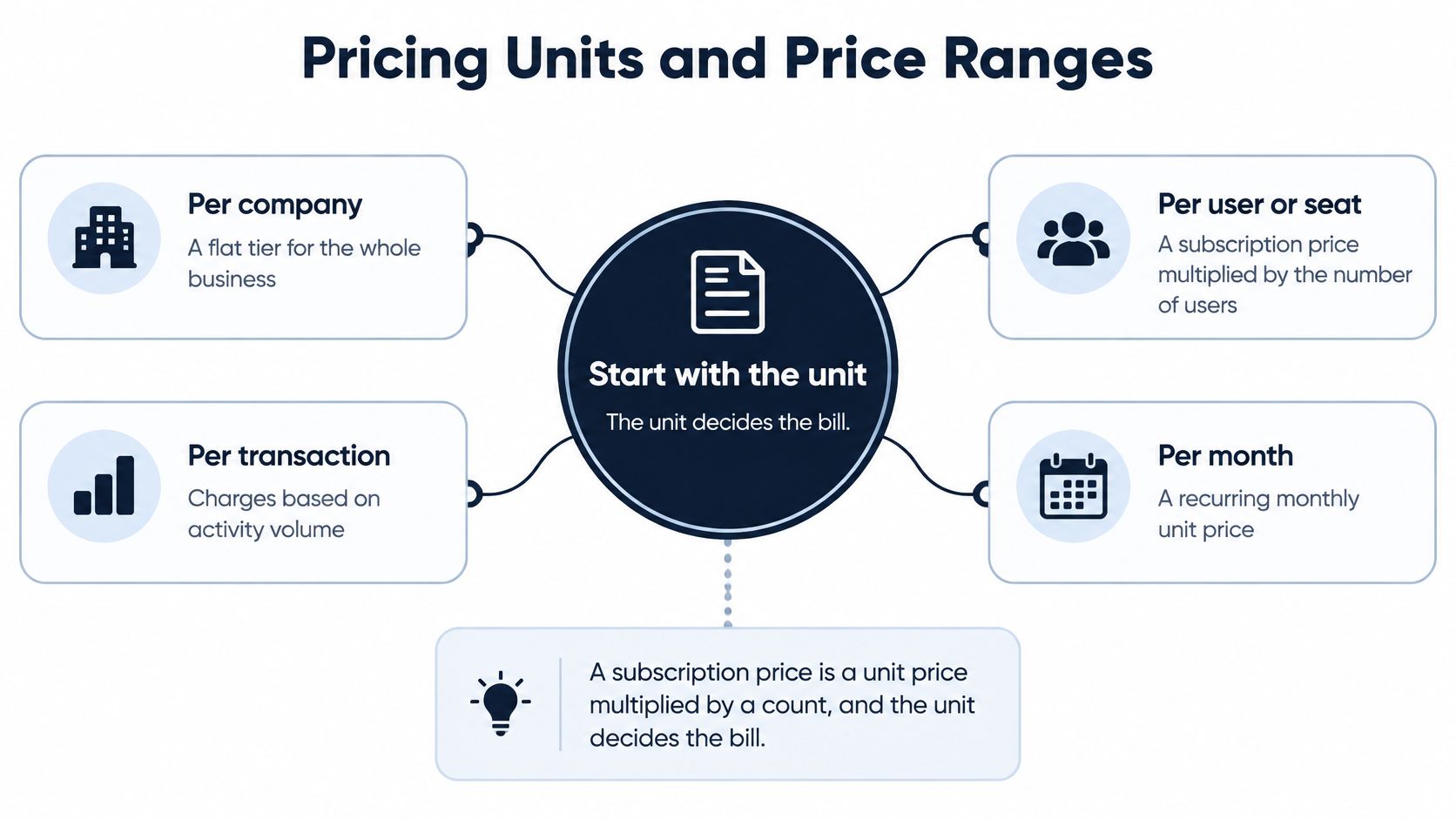
Four units do most of the work in this category:
- Per company. A flat tier covering the whole business regardless of headcount, which rewards teams and punishes solo operators who pay for capacity they never use.
- Per user or seat. Each additional login multiplies the monthly rate, so the bill grows with hiring rather than with revenue.
- Per module. Budgeting, inventory, multi-currency or advanced reporting sold as a line item on top of the tier.
- Per entity. A business running several companies pays per company file or per consolidation, which is where multi-entity quotes separate sharply from single-company ones.
Scale check on the market behind those units. Mordor Intelligence's accounting software market report values the global market at $21.56 billion in 2025, projects $23.47 billion in 2026 and $35.86 billion by 2031, an 8.85% compound annual growth rate from 2026 through 2031. The same report places web-based accounting solutions at approximately $0 to $450 per user per month and on-premises systems at about $250 to $1,500 per user per month.
The per-user phrasing is the useful part of that range. Take five users on a web-based system. At $100 per user per month, the annual software cost is $6,000. At $450, it's $27,000, before implementation or support. Same headcount, same category, a gap of $21,000 a year.
The restaurant comparison holds up. A tier is the fixed meal, seats are extra covers and modules are the side dishes, so the bill reflects everything ordered rather than the item that caught the eye on the menu.
Adoption and spending context behind those ranges sits in TopToolAdvisor's accounting software statistics collection, where each figure carries its publisher and data year. The question to ask of every quote isn't the amount. It's the unit: per company, per user, per module or per entity. Write that word beside each price before comparing two products, and a surprising number of apparent bargains turn into the more expensive option.
Add-ons That Change the Bill
A second user is where a base plan stops being a base plan. Seat-based plans multiply the monthly rate by the number of logins, so a two-person finance function can pay double the advertised figure before a single module is switched on. Payroll usually arrives next, priced per year rather than folded into the accounting tier. Payment processing is charged per transaction, which means sales volume rather than headcount drives that line.

Modules, caps and the lines that stay off the page
The remaining add-ons follow a predictable order once a business outgrows the base tier.
- Receipt capture and document storage. Often capped by plan, with extra charges above the cap, so a business scanning hundreds of supplier receipts a month hits the ceiling.
- Inventory and budgeting. Either push a buyer into a higher tier or carry a separate module price, and the two routes are rarely the same cost.
- Bookkeeping assistance and data migration. The costs vendor pages most often leave out, and the ones that land hardest in the first year.
- Integration upkeep. Connected apps need maintenance as their interfaces change, and that work recurs rather than finishing at go-live.
Before buying, build one list and use it as a filter. Write down every feature the business will use in the next twelve months, mark which sit inside the tier and which are add-ons, then price the add-ons separately. A cheap entry plan with two or three extras frequently costs more than a mid-range plan that includes them.
The comparison that matters: price the tier a business will need at month twelve, not the tier it can get by with on day one.
Countries price these extras in local currency, so the local page is the one to read. Sage South Africa's accounting pricing page lists Accounting Start at R270 per month including VAT and Standard at R490 per month including VAT, checked October 30, 2026. Start supports a single user. Standard covers two to five. The add-ons decide the rest: additional users R85 per month, additional companies R460, Advanced Inventory R465, Debtors Manager R325, Time Tracking R185, multiple-currency payments R185 and 1GB of storage R20.
A business needing Standard with Debtors Manager and Time Tracking pays R1,000 per month, roughly double the base price. Start looks cheaper on the page, but with one user it can't run a team, so the cheapest base plan is not the cheapest operating choice as soon as a second person needs access. The VAT-inclusive difference between the two tiers is R220 per month, or R2,640 a year, before any add-on is added.
AI sits inside this same decision now. Stealth Agents research on AI bookkeeping automation statistics reports that AI bookkeeping adoption among surveyed U.S. small-business owners rose from 28% in 2024 to 45% in 2025, and describes newer products competing on bundled pricing, with one 2026 entrant offering a single subscription for up to three organizations and charging only beyond that limit. No break-even figure exists for those features, so test each one against the add-on price it would replace. Automation that shifts spend from labor to a higher tier isn't a saving.
Annual Totals and Payroll Add-ons
Sage's Sage 50 pricing page states a minimum one-year commitment on all three tiers, checked October 30, 2026, and that term changes what the monthly figure means. A buyer who expects to switch software within twelve months still pays the full year.
| Item | Displayed rate | Twelve-month cost | Basis |
|---|---|---|---|
| Sage 50 Pro Accounting | $132.17 per month | $1,586.04 | One-year minimum commitment |
| Sage 50 Premium Accounting | $182.50 per month | $2,190.00 | One-year minimum commitment |
| Sage 50 Quantum Accounting | $271.17 per month | $3,254.04 | One-year minimum commitment |
| Sage 50 payroll, one to ten employees | $1,155 per year | $1,155 | Separately priced add-on |
| Premium Accounting with Payroll | $1,654 per year | $1,654, contents to confirm with vendor | Bundle contents unclear |
At the displayed rates the floor is $1,586.04 for Pro, $2,190.00 for Premium and $3,254.04 for Quantum across twelve months. Standalone, Premium plus payroll for one to ten employees totals $3,345 in the first year.
Sage also lists $1,654 per year for Premium Accounting with Payroll. That figure is lower than Premium alone at $2,190, so it can't be read as a full bundle total until the vendor confirms what it covers.
Don't accept a payroll saving until the quote states the bundle contents. A line that looks cheaper than the component above it usually has a narrower scope.
Compare twelve-month totals rather than monthly figures, and confirm whether a payroll price is a bundle or an extra charge before signing. For per-employee payroll pricing across other vendors, TopToolAdvisor's best payroll software for small business shortlist puts the plans side by side.
Matching Tiers to Your Business Situation
The right tier is the lowest one that covers users, entities and modules at the same time. Six situations account for most small-business buyers, and each one points to a first tier and the cost that forces the upgrade.
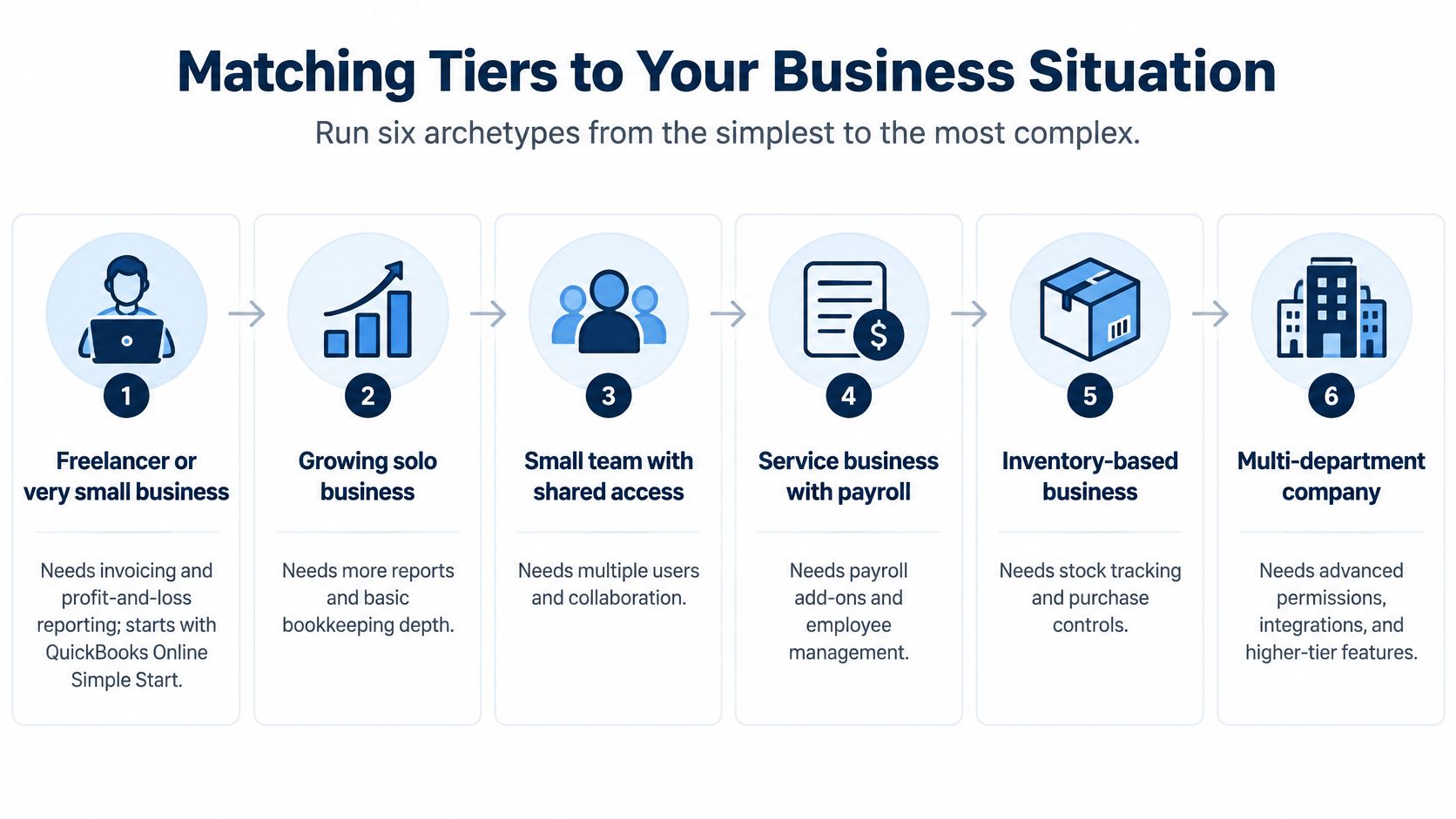
- Freelancer or very small business. QuickBooks Online Simple Start is the clearest fit among the researched options for invoicing and profit-and-loss reporting, provided one user is enough. The user limit, not the feature list, is what pushes a growing sole trader upward.
- Employer with staff. Steps up to Essentials or Plus for shared access and prices payroll as its own annual line before comparing the two tiers against each other.
- Ecommerce business. Budgets payment processing and inventory first, because both charges move with sales volume rather than seats, and a busy quarter changes the total in a way a slower one doesn't.
- Contractor. Checks multi-user access and the price of a second seat before anything else. A site supervisor and an office administrator usually need to be in the file on the same day, which retires the single-user tier.
- Nonprofit. Confirms the vendor's nonprofit terms rather than assuming the published list price applies, since a nonprofit rate and a list price aren't the same number.
- Multi-entity company. Compares Sage 50 Premium or Quantum against separate subscriptions for each entity, because Premium adds multi-company consolidation and a second subscription can cost more than the step up.
The test that works across all six takes ten minutes:
- Count the users who need full access, not read-only roles.
- Count the entities, including any second company file the owner keeps for a side venture.
- List the modules the business will run within twelve months, inventory and payroll included.
- Pick the lowest tier that covers all three, then price the add-ons that sit outside it.
For businesses outside the US dollar pages, the local currency page governs. A South African sole trader or microbusiness with one user fits the Start tier, and the deciding factor is whether a second person will need access inside the next twelve months. If so, the Standard tier plus any required module is the practical entry point, not the cheaper single-user plan.
These are starting points, not endorsements. TopToolAdvisor's best accounting software for small business shortlist compares eight to ten products on the same weighting, which narrows the field faster than reading six pricing pages in one sitting. The tier decision still belongs to the buyer, and the quote settles it.
Records Features That Protect the Purchase
A cheap subscription only saves money if the records survive a tax review. The U.S. Internal Revenue Service says business books must show gross income, deductions and credits, and that accounting software has to meet the same basic recordkeeping principles as paper books, according to the IRS guidance on what records to keep, updated November 3, 2025 on a page dated 2017. The same guidance states that requirements applying to hard-copy books also apply to electronic records, and that employment records generally must be retained for at least four years.
That turns three software features into buying criteria, and none of them appear on a pricing table:
- Export. Can transactions and reports leave the system in a usable format if the business changes vendors? Request a sample export before committing, and open the file to confirm the line detail survived.
- Audit trail. Does the system show who changed a record and when? A report that can be edited without a trace isn't a record of anything.
- Historical access. Do transactions stay reachable for the full retention period, including after a subscription ends? Ask what happens to the data on cancellation, and in what form.
A vendor's claims about automation aren't proof of tax compliance. The IRS guidance doesn't prescribe any product or price, so the test is whether source documents and transaction history can be produced during the retention period.
Put the retention period for payroll records next to the subscription cost when the budget is built. Employment records generally need at least four years of cover, which makes storage limits, archive fees and export formats part of the annual cost rather than an afterthought. A plan that can't produce a four-year-old payroll record on request has cost more than the money it saved.
Confirm the Full Annual Cost Before You Sign
Five checks turn a set of vendor pages into a defensible budget.
- Open the vendor's pricing page and note the date. TopToolAdvisor warns that vendors update prices without notice and advises confirming on the vendor's site first. The page the buyer is looking at governs, not a comparison published months earlier.
- Record the pricing unit for every price. Per company, per user, per module or per entity, written beside the number, as covered in the seat arithmetic above.
- Build the twelve-month total. Include any minimum commitment, payroll, payment processing and the two add-ons the business expects to use, using the same method as the Sage 50 table.
- Compare two or three tiers, including the step-up. Check whether a promotional rate ends after three months and what the standard rate is once it does.
- Request a written quote. It should list what's included, what's extra, the billing currency, and whether payroll is a bundle or an additional charge.
The final figures belong to the vendor's quote rather than to any shortlist. The action for this week is to build a twelve-month total for the top two tiers, payroll and expected add-ons included, and to keep the two numbers side by side until the quote arrives.
Start with the two shortlists, then settle the numbers. Pull the accounting candidates from TopToolAdvisor's small business shortlist and the payroll options from the payroll shortlist, choose two tiers that fit the user and module count, and build a twelve-month total for each before a trial begins. If the two totals land within a few hundred dollars of one another, the deciding factor is the add-on list and the export test, not the monthly figure on the pricing page.
Questions or corrections: editorial@toptooladvisor.com