Guide · General
How Much Does Cloud Storage Cost Per TB in 2026
How much does cloud storage cost in 2026? Compare per-TB rates for AWS, Google and Azure, plus the egress and request fees that decide the real monthly bill.
By the TopToolAdvisor research desk · Updated November 25, 2026 · 18 min read
Standard object storage runs about $0.018 to $0.023 per gigabyte-month in 2026 across Azure Blob Storage Hot, Google Cloud Storage Standard, and Amazon S3 Standard, so 1 TB of stored capacity costs roughly $18 to $23 a month based on vendor rates checked in November 2026. For light personal files, Google One Basic lists 100 GB at $1.99 a month on the same check date, giving solo buyers a flat consumer baseline before metered enterprise fees enter the picture.
Most pricing guides stop at that raw gigabyte number, which is why business storage invoices rarely match the initial estimate. Moving 5 TB out of a major cloud provider just once can cost four to five times more than storing that same data for a full month. Anyone asking how much does cloud storage cost needs two separate figures before signing a contract: the idle space rate and the total monthly workload bill once API requests, retrieval charges, and outbound network transfers are priced in.
Table of Contents
- What One Terabyte of Cloud Storage Costs in 2026
- Why the Price per Gigabyte Is Not the Bill
- Backup, Sync and Collaboration Storage Bill Differently
- What Four Common Workloads Cost Each Month
- How Access Frequency Moves the Price Between Tiers
- How to Estimate Your Own Monthly Bill in Six Steps
- Choose the Tier by Access Pattern Before You Compare Vendors
What One Terabyte of Cloud Storage Costs in 2026
A terabyte of standard object storage that cost about $200 a month in 2009 now lists for under $25 across the three largest clouds. The catch is what that figure buys: idle capacity only, matched to the right product category. Personal files sit in flat-rate consumer plans, while business workloads running applications, servers, or shared repositories pay metered hot-tier rates on Amazon S3, Google Cloud Storage, and Azure Blob Storage.
Each vendor's own pricing page, checked November 2026, lists the hot tier at $0.023 per gigabyte-month for Amazon S3 Standard, $0.020 for Google Cloud Storage Standard, and $0.018 for Azure Blob Storage Hot. The table below prices 1 TB at each of those published rates before taxes, outbound transfer, and API request charges. TopToolAdvisor quotes each starting price word for word from the vendor's page, with the date it was checked, so teams can separate list capacity from add-on fees.
Published Cloud Storage Rates by Vendor and Year
The gap between active hot storage and deep archive storage now spans more than an order of magnitude. Placing current hot rates next to archival rates and earlier market benchmarks shows how steeply raw capacity prices have compressed.
| Provider and product | Price per GB-month | Cost of 1 TB per month | Outbound transfer per GB | Source and year |
|---|---|---|---|---|
| Amazon S3 Standard | $0.023 | About $23 | Billed separately with limited free allowance | AWS pricing page, checked November 2026 |
| Google Cloud Storage Standard | $0.020 | About $20 | $0.12 | Google Cloud pricing page, checked November 2026 |
| Azure Blob Storage Hot | $0.018 | About $18 | Billed separately by region | Azure pricing page, checked November 2026 |
| Archive tier, AWS Deep Glacier | Below $0.001 | Under $1 | Retrieval fees apply | 2020 academic analysis of cloud storage prices |
| AWS S3 at launch, 2006 | $0.15 | About $150 | Excluded from 2006 headline rate | 2020 academic analysis |
| Public-sector benchmark, 2009 | $0.20 | About $200 | Excluded from benchmark | Public-sector audit reporting 2009 and 2014 prices |
| Public-sector benchmark, 2014 | About $0.05 | About $50 | Excluded from benchmark | Public-sector audit reporting 2009 and 2014 prices |
Why Raw Capacity Looks Cheap Today
Sub-$25 terabyte rates look unusually low only when viewed without the twenty-year price drop behind them. When Amazon Web Services launched S3 in 2006, commercial object storage opened at approximately $0.15 per gigabyte-month (about $150 per terabyte). Public-sector procurement figures in the Snohomish County public-sector audit record show cloud storage dropping from nearly $200 per terabyte per month in 2009 ($2,400 annually) to about $50 per terabyte per month in 2014 ($600 annually), a decline of roughly 75% over five years before counting transfer, support, or redundancy.
Archival offerings pushed idle capacity even lower, eventually falling below $0.001 per gigabyte-month for long-term cold retention. That long decline explains why buyers often treat storage capacity as a near-zero line item during initial architecture planning.
What the Rate Table Leaves Out
Every rate in the table above excludes the usage meters that drive invoice surprises. Internet egress charges, per-request API fees, archive retrieval charges, and minimum storage duration penalties all sit outside the monthly gigabyte price, and each meter bills on its own schedule. A workload that reads or exports files frequently can outspend its monthly capacity charge within days, so the per-gigabyte sticker is a starting point for an estimate, not the estimate itself.
Why the Price per Gigabyte Is Not the Bill
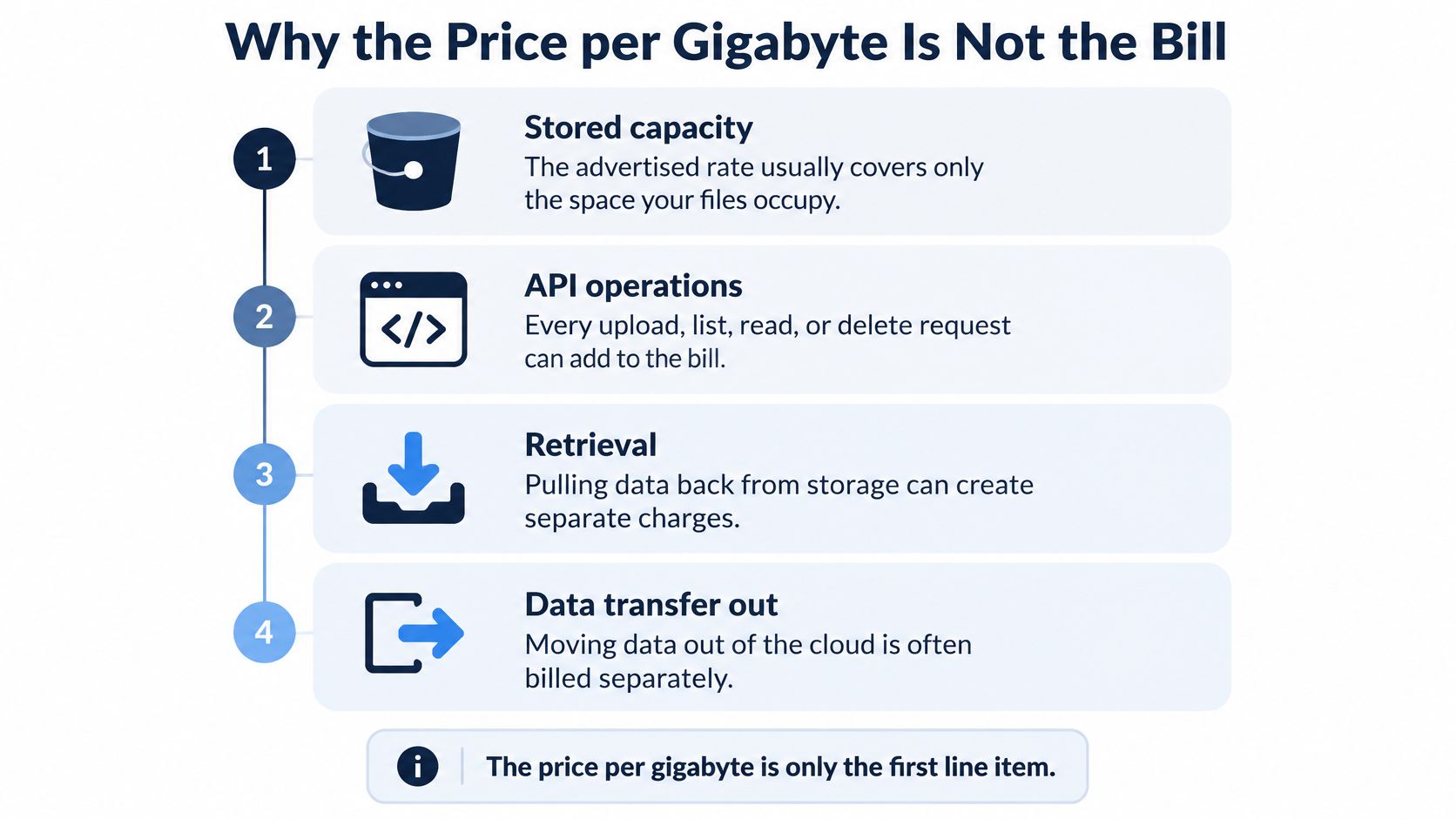
The headline rate is the smallest part of the decision. An advertised per-gigabyte rate pays for only one of four meters that appear on a cloud storage invoice. Every metered object store bills separately for stored capacity, API operations, data retrieval, and outbound network transfer (egress). Comparing vendors solely on the first line leaves three-quarters of the pricing structure unexamined.
The diagram below maps all four billing lines so buyers can trace where non-capacity charges attach to everyday file activity.
Inside a Modeled Monthly Cloud Bill
Google Cloud's published pricing example shows how quickly small usage charges stack onto a tiny bucket. A company storing 50 GB of Standard storage at $0.020 per GB pays $1.00 for space, $0.05 for 10,000 Class A operations (writes and listings at $0.005 per 1,000), $0.02 for 50,000 Class B operations (reads at $0.0004 per 1,000), and $0.12 for just 1 GB of internet egress ($0.12 per GB). The modeled monthly invoice lands at $1.19 on the Google Cloud Storage pricing page.
The ratio inside that $1.19 bill is the part buyers should study first. Moving 1 GB out to the public internet ($0.12) costs six times as much as keeping that same gigabyte parked in Standard storage for an entire month ($0.02). Exporting even a modest share of that 50 GB bucket in egress alone eclipses the $1.00 fee for storing all 50 GB. A low storage rate therefore says very little about the cost of a working dataset that users read, write, and share.
Buyer rule: Judge any cloud storage vendor by its monthly total cost of ownership for your actual workload, never by the headline rate per stored gigabyte.
Why No Universal Storage Rate Exists
Even raw capacity carries different rates across a provider's catalog. Active tiers, archival tiers, redundancy choices, and movement charges all price different engineering work. That is why broad cloud computing statistics are useful for context but cannot replace a workload-level bill estimate.
- Active tiers price in speed and availability: Frequently accessed tiers cost more per gigabyte because providers keep data ready for immediate reads and high durability without retrieval surcharges.
- Archival tiers shift costs to access time: Lower monthly capacity rates come with minimum storage periods, slower rehydration windows, and separate retrieval fees whenever files are pulled back.
- Redundancy and movement multiply total spend: Cross-region replication, metadata lookups, and outbound bandwidth scale with application behavior rather than disk volume.
An archival tier can look cheaper than Standard storage and still become expensive when files must be restored quickly. A collaboration bucket can look similar to a backup bucket and still bill very differently once users sync, restore, and share files. The useful comparison starts with the full activity pattern: how much data sits idle, how often applications call it, how much leaves the provider network, and who needs immediate access. Regional unit rates and current provider pages still set the final numbers, so finance and IT leads should price each meter before committing to a tier.
Backup, Sync and Collaboration Storage Bill Differently
"Cloud storage" isn't a single software category, yet buyers routinely compare consumer file-sync plans, automated backup tools, collaboration suites, and developer object stores as if they're interchangeable. Each category meters a different unit, enforces a different retention policy, and fails in a different way when something goes wrong.
Picking the wrong category creates both budget distortion and data-loss exposure. A 2026 analysis of cloud backup pricing traps by LionScripts points out that the purchasing question isn't what 1 TB costs on paper, but what 1 TB costs for a specific access pattern and recovery requirement.
Four Storage Categories and What Each One Charges
Before calculating gigabyte workloads, match the job to the right billing model. Sync tools, endpoint backup platforms, seat-based workspaces, metered object buckets, and compliance archives all attach charges to different operational triggers.
| Category | What you pay for | Billing unit | Verify before buying |
|---|---|---|---|
| Sync and drive storage | Capacity shared with mail and photos | Per account, per month | How long deleted files stay recoverable |
| Cloud backup | Protected devices plus retention | Per device or per user, per month | Restore window, restore fees, ransomware copies |
| Team collaboration suite | Seats plus a pooled allowance | Per user, per month | What happens when the pool fills |
| Developer object storage | Capacity, requests, retrieval, transfer | Per gigabyte and per operation | Minimum storage duration and cross-region transfer |
| Archive and compliance storage | Capacity plus retrieval | Per gigabyte, per month, plus read charges | Cost and duration of a full restore |
Why a Sync Folder Is Not a Backup
Consumer sync plans bundle convenience with tight capacity sharing. A free Google account includes 15 GB shared across Drive, Gmail, and Photos, and stepping up to Google One Basic expands that shared pool to 100 GB per month for a single account (US prices, checked November 13, 2026). Tools in this class work well for personal productivity, and team platforms covered in the Dropbox review add structured sharing for small offices, but synchronization solves access rather than disaster recovery.
When a user deletes a directory or a workstation catches ransomware, a sync client faithfully mirrors that deletion or encryption across every connected device. Dedicated cloud backup software bills per protected device or per user alongside a defined retention window, keeping isolated point-in-time versions ready for rollback. Even inside dedicated backup plans, buyers must check the fine print, because some consumer backup tiers retain recoverable versions for only 30 days.
A folder that mirrors changes across laptops in real time isn't a safety net. If an employee wipes or encrypts a directory, sync spreads the damage unless versioned, isolated backup retention sits behind it.
How to Compare Categories on Equal Footing
Team collaboration suites complicate budgeting from another angle: they bill per seat against a pooled storage allowance, which means adding storage often forces an upgrade across every user license or triggers overage blocks when the pool fills. Developer object stores such as Amazon S3, Google Cloud Storage, and Azure Blob Storage avoid per-seat fees entirely, charging per gigabyte plus operations, retrieval, and egress.
To compare any two categories fairly, calculate the effective cost per protected terabyte over 12 months. Write down your retention window, assume at least one realistic restore event, and confirm in writing whether deleted or ransomware-encrypted files remain recoverable across the full period. Factor in your region, redundancy setting, currency, and local taxes before treating any US list price as final.
What Four Common Workloads Cost Each Month
Abstract per-gigabyte rates become much clearer once they're applied to real monthly operating patterns. Current US-region comparison data from Finout's cloud storage pricing breakdown places hot object storage across major providers at roughly $0.018 to $0.0255 per GB-month, while outbound internet egress commonly starts around $0.087 to $0.12 per GB and retrieval can add roughly $0.02 to $0.05 per GB depending on the tier.
Those three numbers produce a counterintuitive result for business budgets. A company storing 5 TB of hot data pays roughly $100 to $125 per month for storage capacity, yet moving that same 5 TB out to the internet just once costs roughly $435 to $600 depending on vendor and region. Storing the dataset for a month costs roughly a fifth to a quarter of what it costs to export it a single time.
Sample Monthly Bills by Workload
Every workload below uses the same underlying market rates, yet the line item that controls the invoice shifts completely based on how often files leave the cloud.
| Workload | Stored data | Capacity per month | Egress or retrieval exposure | Extra charges to budget |
|---|---|---|---|---|
| Nightly server backup, low change | 1 TB | About $18 to $26 | Near zero if restored in the same region | Minimum storage duration, early deletion fees |
| Nightly server backup, full download once | 5 TB | About $100 to $125 | $435 to $600 at $0.087 to $0.12 per GB | Request volume, restore time |
| Shared team documents and images | 1 TB | About $18 to $26 | Small if access stays in the same region | Per-seat charges when billed through a suite |
| Active media library served to users | 5 TB | About $100 to $125 | Egress dominates: $435 to $600 per full pull | CDN, high request counts, cross-region copies |
| Compliance archive with one annual restore | 20 TB | About $20 or less at archive rates | About $400 to $1,000 at $0.02 to $0.05 per GB retrieval | Minimum retention, deletion fees, restore latency |
Where Capacity Stays Predictable
Low-change server backups and internal document libraries behave closely to the headline rate, provided data stays inside the same cloud region during normal work. A 1 TB nightly server backup with minimal daily changes sits around $18 to $26 per month in hot object storage, generating almost no transfer spend until an administrator triggers an off-cloud restore. Similarly, 1 TB of shared team documents accessed by applications in the same region avoids internet egress altogether, leaving capacity (or per-seat suite licensing) as the primary monthly expense.
Long-term compliance archives look even leaner during quiet months. Parking 20 TB at archival rates below $0.001 per GB-month keeps idle capacity around $20 or less per month. The bill stays flat until an auditor or legal team requests a full restore, at which point retrieval fees at $0.02 to $0.05 per GB add roughly $400 to $1,000 in a single billing cycle before any outbound transfer charges are counted.
Five Workloads Where Egress Dominates the Bill
Shopping for the cheapest per-gigabyte sticker price backfires whenever data leaves the provider's network regularly. Five business workloads routinely flip the bill so that outbound transfer outweighs storage capacity every month:
- Media delivery: Video libraries, podcast catalogs, and high-resolution image assets served directly to external users multiply egress with every viewer stream.
- Analytics exports: Data teams pulling daily warehouse extracts into external BI platforms or partner systems pay outbound transfer on every scheduled run.
- Disaster recovery tests: Validating backups by restoring full multi-terabyte sets outside the primary region triggers both retrieval and transfer meters at once.
- AI model checkpoints: Moving large training weights across regions or external GPU clusters generates sharp, recurring bandwidth charges.
- Cloud migrations: Leaving a vendor with tens of terabytes stored turns a routine vendor switch into an expensive one-time exit fee.
Locate the workload row in the table above that most closely mirrors your team's monthly file movement. Once you know whether your files sit idle or travel constantly, you can evaluate how storage tiers shift the price of every read and write.
How Access Frequency Moves the Price Between Tiers
Cloud providers divide object storage into temperature tiers (Hot, Cool, Cold, and Archive) so buyers can trade instant, low-cost reads for cheaper idle space. Moving files down a tier shrinks the monthly gigabyte charge, but it raises the cost of touching those files later. If a team moves data into a colder tier without checking how often applications read it, operation charges can erase the capacity discount.
Published illustrative rates in Microsoft Azure's Blob Storage cost-estimation guidance (checked in 2026 on the Azure documentation page) show exactly how steeply operation pricing climbs as storage gets colder.
Azure Blob Tier Operation Prices per 10,000 Operations
Every read and write call carries a distinct price per 10,000 operations across Azure's four tiers, and colder tiers add per-gigabyte read fees on top of those request charges.
| Tier | Reads per 10,000 | Writes per 10,000 | Access charge on reads | Best fit |
|---|---|---|---|---|
| Hot | $0.0044 | $0.055 | No per-gigabyte access charge listed | Active collaboration data read daily |
| Cool | $0.01 | $0.10 | Per-gigabyte access charge applies | Data read a few times a year |
| Cold | $0.10 | $0.18 | Per-gigabyte access charge applies | Rarely opened project files |
| Archive | $5.50 | $0.11 | Per-gigabyte access charge plus rehydration delay | Compliance and disaster recovery copies |
The Recovery Cost Trap in Archive Tiers
Look at the jump between Hot reads ($0.0044 per 10,000) and Archive reads ($5.50 per 10,000). Archive read operations cost far more than Hot read operations on the same platform. On top of that, Azure states that Cool, Cold, and Archive data incurs separate per-gigabyte access charges whenever data is read, and outbound transfers leaving an Azure region are billed on yet another meter.
Recovery reality check: One million archive read operations at $5.50 per 10,000 generate $550 in operation charges alone before a single gigabyte of retrieval or outbound transfer is billed.
That single calculation explains why expected recovery volume and object count must decide the storage tier before stored terabytes do. A backup repository containing millions of small files can cost more to restore once from Archive than it would have cost to store in Cool for years.
Practical Tiering Policy and Retention Traps
Teams avoid tiering surprises by mapping data classes to clear access rules instead of chasing the lowest monthly storage rate:
- Keep active collaboration files in Hot or Standard storage. Daily reads, frequent edits, and automated indexing need low operation costs and zero per-gigabyte retrieval fees.
- Place predictable low-access data in Cool storage. Quarterly financial records, completed client deliverables, and secondary backups read a few times a year benefit from lower capacity rates without long rehydration waits.
- Reserve Archive strictly for compliance and accepted-delay disaster recovery. Use archival storage only when the business has signed off on both the restore wait time and the full recovery invoice.
Watch out for minimum storage durations and early deletion charges when automating lifecycle rules. Deleting or moving a file out of a Cold or Archive tier before the vendor's minimum retention window expires still triggers billing for the remaining days. Because regional prices, retention rules, and transfer fees change over time, verify every figure directly on the vendor's official pricing page on the exact date of purchase.
How to Estimate Your Own Monthly Bill in Six Steps
Guessing a storage budget from a vendor's homepage rate guarantees variance once the first invoice arrives. Usage-based cloud storage combines capacity, operations, retrieval, and network transfer, and as shown in Google Cloud's storage pricing examples, even modest request counts and small internet downloads alter the final total.
A repeatable six-step estimate lets any finance or operations lead price two or three providers side by side without missing hidden meters. Keep four core variables identical across every vendor you quote: average stored capacity, monthly new and deleted data, operation volume, and data transferred outside the provider or region.
Six Steps to Price a Storage Workload
- Measure your 30-day average stored capacity, not today's snapshot. Cloud providers calculate storage charges across gigabyte-hours throughout the billing cycle, so a month-end spike or mid-month cleanup distorts a single-day count. Pull a 30-day rolling average from existing server reports or billing exports.
- Split your files into four access classes. Separate active daily files, monthly reference data, once-a-year records, and audit-only archives so you don't pay hot rates for stagnant folders or archive penalties for active ones.
- Count monthly API operations straight from application logs. Separate write and list calls from read calls, because providers charge meaningfully different rates for each operation class. High-frequency automated sync jobs and backup scanners often generate far more list operations than teams expect.
- Price outbound transfer and cross-region replication on their own lines. Keeping compute and storage in the same region avoids many network transfer fees, whereas serving files over the public internet or copying buckets across regions adds metered charges. Note that AWS explicitly separates request charges from data-transfer pricing and provides limited free internet transfer allowances that vary by scope and region.
- Layer in minimum retention windows and early deletion fees. If your workload overwrites or purges files every two weeks, placing those objects in a cool or archival tier with a longer minimum storage period creates phantom charges for deleted data.
- Add region, currency, tax, and support tier on the purchase date. Regional data centers carry different list rates, and enterprise support plans or local taxes sit outside the raw storage calculator. Sanity-check the finished spreadsheet against a published vendor example, such as Google Cloud's modeled 50 GB bill, to confirm no unit conversion slipped between gigabytes, terabytes, and operation blocks of 1,000 or 10,000.
Auditing Your First Real Invoice
Even careful models rarely match the first production bill to the penny. When the actual invoice lands above your estimate, don't adjust the whole budget blindly. Map every billed line item back to one of the four core variables (capacity, churn, operations, or outbound transfer) and recalculate the single largest variance first. In most cloud deployments, one unexpected sync loop, cross-region copy job, or uncached download accounts for nearly the entire overrun.
Choose the Tier by Access Pattern Before You Compare Vendors
Most software buyers tackle cloud storage backward. They open vendor comparison tables, sort by the lowest monthly rate per gigabyte, and pick a logo before mapping how their files move. Fixing the access pattern first, pricing the total workload bill second, and comparing vendors last prevents costly migrations and surprise retrieval invoices.
Workload Verdicts Without Vendor Hype
Different team sizes and file behaviors point cleanly to different storage products:
- Solo users or two-person shops under 100 GB: Start with Google One Basic at $1.99 per month for 100 GB (US price, checked November 13, 2026), cited in Purist's 2026 cloud drive pricing comparison, which builds on the free 15 GB shared across Drive, Gmail, and Photos. Upgrade capacity only when that shared pool approaches its ceiling.
- Teams of 5 to 50 with steady document collaboration: Price a per-seat collaboration suite directly from each vendor's pricing page, record the exact check date, and confirm in writing what happens when the pooled storage allowance fills. Seat prices change frequently by tier and billing cycle, so verify current USD rates directly rather than relying on undated summaries.
- Businesses with growing datasets and unpredictable egress: Use metered object storage from Amazon S3, Google Cloud Storage, or Azure Blob Storage, pair it with automated lifecycle rules, and get finance approval on a dedicated monthly egress budget before launch.
- Organizations archiving compliance records: Move files into an archive tier only after running a timed test restore on a sample dataset and signing off on the projected retrieval cost, since archive read fees can outweigh months of capacity savings.
How to Finalize Your Shortlist
Once your access pattern and four-variable estimate are locked in, evaluate shortlisted providers from the best cloud storage for business directory on the exact same four lines: capacity, API operations, retrieval, and outbound transfer. TopToolAdvisor lists prices as the cheapest paid plan in US dollars, as shown on the vendor's page on the date it checked, and shows the date each price was quoted so buyers can verify current terms without guesswork.
Build your four-variable workload sheet before opening another vendor pricing page: record your 30-day average gigabytes, monthly read and write counts, required retention window, and expected outbound gigabytes. Plug those identical numbers into the official calculators for Amazon S3, Google Cloud Storage, and Azure Blob Storage, record the date you pulled each rate in US dollars, and compare the full monthly total rather than the sticker price per gigabyte.
Cite this page
TopToolAdvisor. "How Much Does Cloud Storage Cost Per TB in 2026." Updated November 25, 2026. https://toptooladvisor.com/how-much-does-cloud-storage-cost
Questions or corrections: editorial@toptooladvisor.com