Guide · General
Payroll Service Fees Explained: What You Really Pay
Compare payroll service fees by component, company size and pay frequency, and learn how to calculate an all-in cost per employee before you sign.
By the TopToolAdvisor research desk · Updated November 29, 2026 · 12 min read
Most payroll comparisons start with the monthly subscription and stop there. That ranking is close to useless. A plan advertised at a low per-employee rate can double once weekly pay, seasonal hiring, a second state and a run of corrections reach the invoice, while a higher sticker price with everything bundled can cost less by December.
The number that ranks vendors properly is one normalized annual cost per employee: every vendor fee, every setup charge, every correction, plus the internal labor payroll consumes, divided by active headcount. Run the same three scenarios through every vendor and the order changes.
The popular advice says to pick the cheapest plan that covers your headcount. Headcount isn't the variable that decides this. Pay frequency, exception volume and a monthly minimum decide it more often, and none of them appear in the advertised price.
Table of Contents
- What Payroll Service Fees Actually Cover
- How Fees Shift With Company Size
- Calculating the True Cost Per Employee
- Pay Frequency and Scenarios That Change the Bill
- Request an All-In Quote Before You Sign
- When Outsourced Payroll Beats Doing It In-House
What Payroll Service Fees Actually Cover
Three charges sit under one invoice. A base platform fee buys access to the system. A per-employee or per-payslip charge scales with how often and how widely you pay. Add-ons attach to specific events, and vendors bundle them differently, so two plans with the same monthly headline can produce annual bills hundreds of dollars apart.
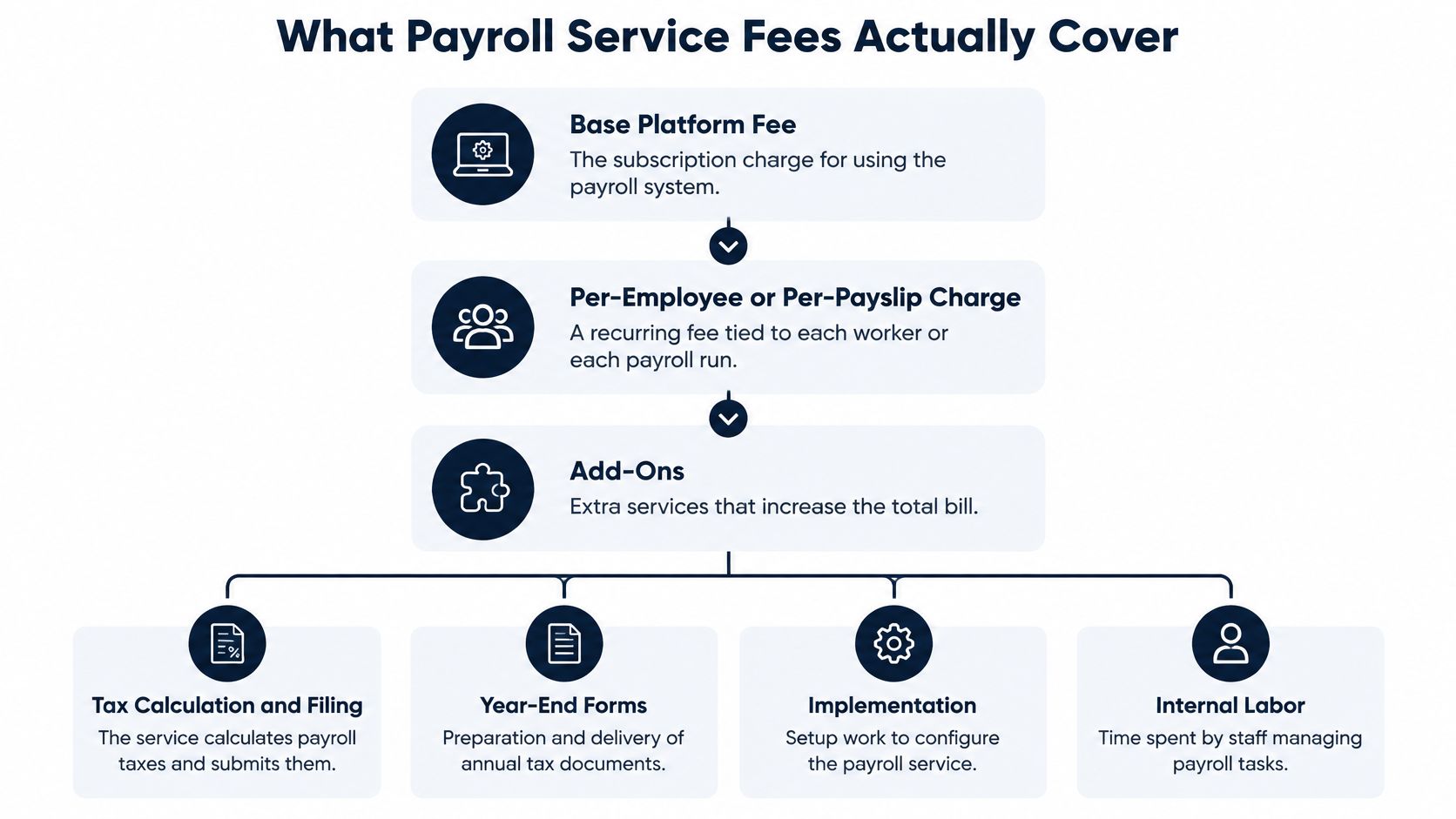
The add-ons a buyer will meet, whichever provider the quote comes from:
- Tax calculation and filing: withholding math, deposit scheduling and quarterly returns.
- Year-end forms: W-2s and 1099s, priced per form or bundled into January.
- Off-cycle and bonus runs: every run outside the scheduled calendar, including termination checks.
- Amendments and corrections: billed per corrected return or per reissued paycheck.
- Implementation and integrations: a setup fee plus, often, a per-connection charge for accounting or HR sync.
- Payment processing: direct deposit, instant pay and wires, priced per transaction or per rail.
The federal figures that must sit inside the base fee
The IRS Publication 15 for 2026 sets Social Security at 6.2% for the employer and 6.2% for the employee (12.4% combined) and Medicare at 1.45% each side (2.9% combined). The 2026 Social Security wage base is $184,500 per employee, and Medicare has no wage cap.
Higher earners add a second test. The IRS Form 941 instructions for 2026 require employers to withhold the 0.9% Additional Medicare Tax on wages above $200,000, and that portion is employee-only. A quote that doesn't state whether wage-base tracking and that extra withholding sit inside the base fee hasn't answered the question.
Ask before anything else: does the base fee include calculating, depositing and filing federal employment taxes, or is each of those a separate line?
| Fee type | Usual charge pattern | When it applies | Federal figure to confirm (source, year) |
|---|---|---|---|
| Base platform fee | Flat monthly or annual amount | Every billing period | Must state whether tax calculation is inside it |
| Per-employee fee | Charged per active employee | Every payroll run | None |
| Per-payslip fee | Charged per paycheck issued | Weekly or biweekly pay multiplies it about four times | None |
| Tax calculation and filing | Included in base or charged per filing | Every quarter and at year-end | Social Security 6.2% each side, Medicare 1.45% each side (IRS Publication 15, 2026) |
| Wage-base tracking | Included or per employee | When earnings cross the cap | $184,500 Social Security cap, no Medicare cap (IRS Publication 15, 2026) |
| Additional Medicare Tax | Withholding handling | Wages above $200,000 | 0.9%, employee-only (IRS Form 941 instructions, 2026) |
| Year-end forms | Per form or bundled | January | None |
| Off-cycle and bonus runs | Per extra run | Bonuses, terminations and corrections | None |
| Amendments and corrections | Per correction | After a wrong figure reaches an employee or agency | None |
| Implementation and integrations | One-time setup plus per-connection fees | Onboarding and accounting or HR sync | None |
| Tax deposits and payment rail | Included or separate; some methods charge a fee | Each deposit | Business tax account, Direct Pay or EFTPS (IRS guidance, 2026) |
Pay frequency decides what the per-payslip line costs. Weekly pay issues about 52 checks per employee per year against 12 on a monthly cycle, so a per-payslip charge multiplies roughly four times for identical headcount. That mechanic alone can push a 10-person weekly payroll past a 30-person monthly one.
Before comparing payroll modules, check which HR platforms handle tax tables and filing at all. TopToolAdvisor's HR software shortlist groups platforms by function, so the payroll question gets answered before the feature question does. A quote you can rank against another quote expresses all of the above as one annual total per employee.
How Fees Shift With Company Size
A low headline rate is a weak way to rank payroll vendors once company size changes. Fixed charges barely shrink as you add people, so the same processing stack costs far more per employee at 15 staff than at 500. The Australian Payroll Association benchmark covers 1,741 organizations and more than 40 million payslips. It reports average cost per payslip of $121.57 under 50 employees, $18.43 for 50 to 200, $13.66 for 201 to 500, and $3.66 above 10,000. Those amounts are Australian-dollar benchmark averages, not US dollar list prices.
| Organization size | Average cost per payslip | Annual cost per employee at 12 payslips a year | Main reason for the difference |
|---|---|---|---|
| Under 50 employees | $121.57 | $1,459 (per-payslip figure × 12) | Fixed setup and governance spread over few staff |
| 50 to 200 employees | $18.43 | $221 (per-payslip figure × 12) | Fixed costs spread over more staff |
| 201 to 500 employees | $13.66 | $164 (per-payslip figure × 12) | Scale lowers the per-payslip cost further |
| More than 10,000 employees | $3.66 | $44 (per-payslip figure × 12) | Largest volumes spread fixed costs most thinly |
On that single 12-payslip basis, the under-50 band still runs more than six times the annual cost per employee of the 50 to 200 band. Setup, tax configuration, payroll review and year-end processing stay on the bill at every size. A 15-person firm splits that overhead across 15 people. A 500-person employer spreads the same kind of fixed work much thinner, which is why the per-payslip average keeps falling.
Two numbers decide which quote is cheaper. Vendors rarely volunteer the second one. Ask for the base fee and the marginal per-employee or per-payslip fee separately, then run both at your real headcount and pay schedule.
The number that settles it: total annual cost at your headcount and pay frequency. The rate card never does.
A cheap per-employee rate still loses to a high monthly minimum. It loses again when filings, off-cycle runs, integrations and year-end forms sit on separate lines. Read those four lines before you rank per-employee rates. Exception volume and that minimum can flip the order a headline subscription suggests. Put every quote on one annual cost per employee at your size, then compare.
Use the bands to see how scale moves cost. US list prices, tax accounts and filing rules differ from this Australian study, so the shape of the curve is the useful part, not the dollar amounts.
Calculating the True Cost Per Employee
A subscription price answers nothing on its own. It excludes the labor your team spends on payroll and every one-time charge that got you live. Four buckets produce a figure that can be compared across vendors:
- Annual vendor fees: subscription, per-employee, per-payslip, filings and payment charges.
- Implementation and integration costs: setup, data migration, and connections to accounting or time tracking.
- Internal payroll labor: the hours your bookkeeper or office manager spends each cycle, priced at their hourly cost.
- Compliance and amendment charges: penalties, corrected returns and reissued payments.
Divide the total by active employees, and the result becomes a yardstick you can hold against any other quote.

Say a 20-person design studio pays $3,600 in annual vendor fees, $400 to get set up, and carries $1,200 of internal payroll labor and $300 in corrections. That's $5,500 a year, or $275 per employee. The studio can now compare a number against a benchmark instead of a brochure. Price the internal hours at the loaded cost of the person doing the work, not at zero.
What the benchmark says
Deloitte's 2025 global payroll benchmarking survey defines the cost base as payroll technology licensing or subscription fees, third-party vendor and outsourcing charges, and payroll FTE labor, divided by total employees. Across 11 surveyed organizations, six technology and five non-technology companies, the median combined payroll-department cost was $158 per employee annually, with a 25th percentile of $138 and a 75th percentile of $322.
That spread is the point. Service-fee comparisons go wrong when they leave out internal staff, implementation support, exception handling or separate payroll-engineering costs. The sample is large global organizations, so treat the range as an efficiency reference, not a small-business price list.
Controls to apply before you compare
Two quotes are only comparable when they match on the variables that move the number:
- Pay frequency: weekly, biweekly and monthly change both the per-payslip count and the deposit cycle.
- Country count: each jurisdiction adds filings, registrations and often a per-state or per-country fee.
- Employee type: salaried, hourly and contractor paygroups are priced differently.
- Payroll complexity: tips, garnishments, multi-entity pay groups and shift differentials all add handling.
The integration side of the formula has its own cost. Much of what a provider calls integration is a connection to accounting, and this breakdown of accounting software costs covers the other side of that sync.
One line belongs in writing before totals get compared. Ask each vendor who bears a late-filing penalty, who bears the penalty for an incorrect deposit, and what an amended return costs, then ask whether correction services are billed per amendment.
Treat silence as an answer: a quote that doesn't name who pays a late-filing penalty is pricing that risk onto you.
Pay Frequency and Scenarios That Change the Bill
Four employers, same software, four different bills. Each scenario below changes one variable, which is how a comparison should be built.

Same headcount, two pay schedules
Ten employees paid monthly. Twelve paychecks per employee, 120 payslips a year, twelve deposit cycles. A per-payslip charge lands at its lowest multiplier and the base fee dominates the bill.
The same ten paid weekly. Now 520 payslips a year, more deposit cycles, and far more exposure to a correction on any single run. Headcount didn't move. The bill did.
Seasonal and multistate employers
Fifty staff at a restaurant with seasonal hiring. Peak season brings onboarding, terminations, prorated final checks and rate changes for rehires. Every event can trigger a per-run fee or a correction charge, and a monthly minimum doesn't fall in the quiet months. Restaurants, contractors and staffing agencies live here, along with any business paying bonus-heavy wages.
A two-state startup. The second state adds registration work, another withholding account and a second set of filings, and many providers price coverage per state. A company that grows from one to three states sees that line triple without hiring anyone.
The cheapest plan on the page is a hypothesis, not a finding. Weekly pay and a busy exception log can overturn it before the first quarter closes.
Headline-only comparisons can understate the monthly bill by 15% to 30%, according to a payroll service fee guide published by Lathire. That's the gap between the advertised plan and the invoice a fluctuating employer receives.
The test that ends the argument
Take the vendor's complete fee schedule, not the plan summary, and push every profile that applies to your business through it at your real pay frequency. Compare annual totals, then divide by active employees so the ranking rests on one figure.
Run at least two profiles before committing. A single-headcount comparison is the most common way buyers choose a plan that costs more than the one they rejected.
Request an All-In Quote Before You Sign
One procedure converts every component above into a signed decision, and it takes an afternoon.
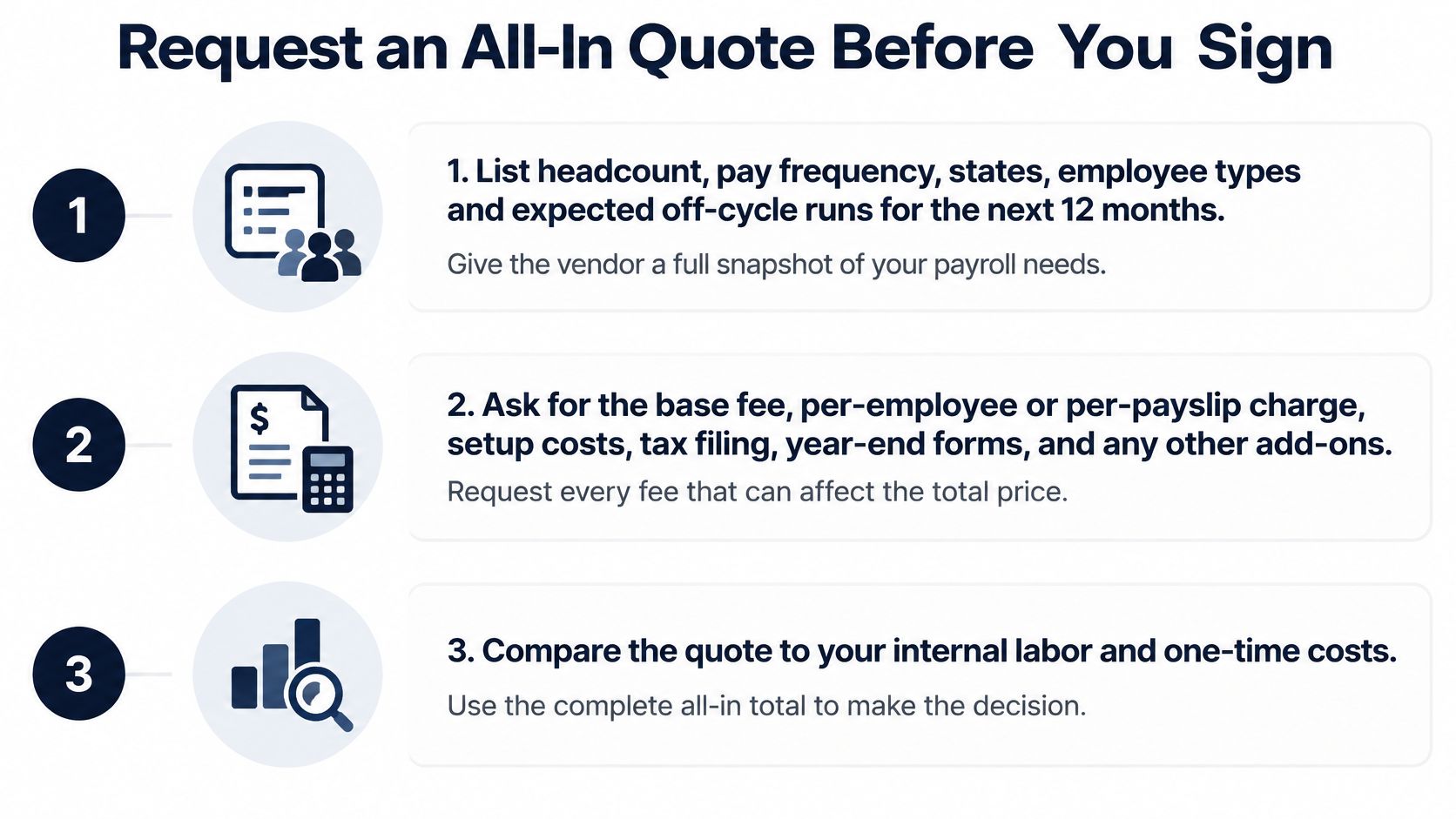
- Write the brief. List headcount, pay frequency, states, employee types and the off-cycle runs you expect over the next 12 months, including bonus cycles and likely terminations.
- Request itemized schedules. Ask every vendor, in writing, for the base fee, the per-employee and per-payslip charges, filings, year-end forms, amendments, integrations, payment processing, setup and penalty liability.
- Model three scenarios. Current headcount, a 12-month growth case and a peak-season case, each priced from the schedule rather than the advertised plan.
- Normalize. Divide each annual total by active employees and rank vendors on that figure alone.
- Pin the terms to dollars and dates. Every price in US dollars, the date checked, and the vendor page or document it came from, then re-confirm on the vendor site before signing.
The payment rail is a separate bill
Processing cost and tax-payment cost are different things. The IRS guidance on employment taxes states that employers can pay federal employment tax through its business tax account, Direct Pay for businesses, or the free Electronic Federal Tax Payment System, and that some other payment methods charge a fee. A provider's advertised price may cover calculation and filing while wires, expedited processing and corrections stay separate.
Confirm three things before signing:
- Which rail the provider uses: and whether the fee for it sits inside the subscription.
- Whether tax deposits are included: or billed per deposit or per quarter.
- Who bears the penalty: a late payment, a late filing, or a corrected return.
TopToolAdvisor lists prices as the cheapest paid plan in US dollars, as shown on the vendor's page on the date it checked. It also warns that vendors can update prices without notice, which is why the date on your written quote matters as much as the figure.
Set each vendor's normalized total beside the benchmark range for your own size band and country count. Keep the two or three whose totals land closest and drop the rest.
When Outsourced Payroll Beats Doing It In-House
The choice is a break-even comparison, and both sides fit on one line. Internal cost is monthly payroll hours multiplied by the hourly cost of the person doing the work, plus the expected cost of errors, penalties and late filings. Outsourced cost is the annual all-in figure divided by headcount.
Working the internal side
Give it numbers. An owner spending 4 hours a month at $50 an hour is carrying $200 a month, or $2,400 a year, before any error exposure. That's the figure a payroll service has to beat once its own fees are added.
Set the $2,400 against an all-in annual quote and add expected error cost to the internal side. A single amended return, a late deposit penalty or a garnishment handled wrong can absorb a month's fee, and a weekly payer has far more chances to trip.
Where the line sits
In-house payroll can be rational for a handful of employees in one state on a simple monthly cycle, where the owner already handles quarterly filings without help.
- Keep it in-house when the internal hours are few, the states are one and corrections are rare.
- Outsource when headcount, pay frequency, state count or exception volume starts climbing, because those variables multiply both internal hours and error risk.
Two commonly cited figures make the case, and both need checking before they enter a business case. A survey summary reports that outsourced-payroll users saved an average of five hours per month, and another cites an average payroll-error correction cost of $291, as summarized in payroll cost statistics for small business. Both are secondary, so confirm the original study and its year before quoting either to a partner or a lender.
The verdict: the subscription price never decides this. The all-in annual cost per employee decides it, and it usually favors in-house only until the second state, the weekly cycle or the seasonal hiring arrives.
If the payroll decision sits inside a wider operations build, software to manage a small business is where to line up the rest of the stack before signing payroll contracts.
Send the same one-page brief to every vendor on your list this week and ask for written quotes that match the same three scenarios: current headcount, a 12-month growth case and a peak season. Rank them on annual cost per employee, confirm each figure in US dollars with the date it was checked, and hold the winner against the benchmark band for your size and country count. TopToolAdvisor scores payroll and HR shortlists on features, ease of use and value with one published method, so the final comparison rests on documented prices instead of a sales call.
Cite this page
TopToolAdvisor. "Payroll Service Fees Explained: What You Really Pay." Updated November 29, 2026. https://toptooladvisor.com/payroll-service-fees
Questions or corrections: editorial@toptooladvisor.com